Participant
February 19, 2022
Answered

How to Get Item Value from Drop-down List

  • February 19, 2022
  • 2 replies
  • 5543 views

Hello All,


I have zero experience in Acrobat Form with multiple selections and foray into drop-down list. Referring to Mr. Thom Parker's article of "Programming list and combo fields in Acrobat and LiveCycle forms - Part 1 of 2", I have learned from you a lot. The example file "ListProgramming_Part1_AcroForm.pdf" is exactly what I need.


I tried to export into .csv file in Excel and would like to display "item value" in the spreadsheet as opposed to "export value" from Drop-down List "Part" . For this purpose, I have googled and acquired some basic knowledge from JavaScript for Acrobat API Reference.


Based on the example file, I added the codes below extra into "Example1" document JavaScript, which contains scripts created.


function expPartValue() {
    if(!event.willCommit){
    var cRowName = event.target.name.split(".").shift();
    var f = this.getField(cRowName + ".PartSelect");
    var a = f.currentValueIndices;
    console.println(f.getItemAt(a, false));
    }
}


In order to test, calling “expPartValue()” function from a the Keystroke Event of "PartSelect" field, the results are displayed in the console window of JavaScript Debugger. Regardless it may be ok with me.(For sure, it is flawed.)
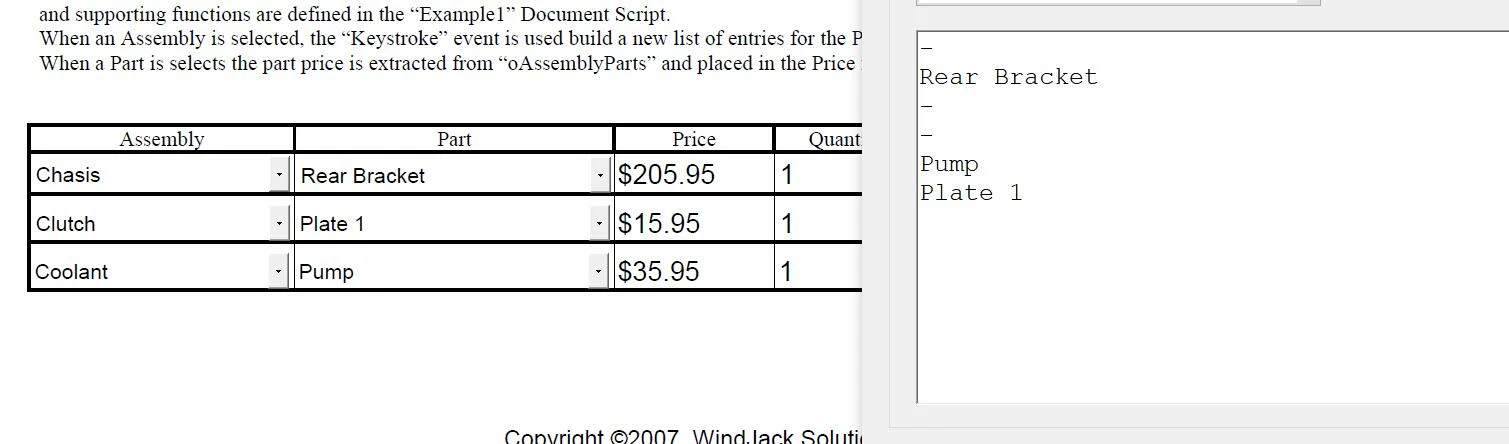


When I replaced "console.println(f.getItemAt(a, false));" with
"event.value = f.getItemAt(a, false);", it does meet the expectation.


May I ask a question about how I can get item value. I am wondering whether the codes are wrong. Any advices from you are highly appreciated.


This topic has been closed for replies.
Correct answer Thom Parker

So first, please keep you question simple and focused on a single topic. The more clear and concise the question, the better the answer. 


You should also read these articles:

https://www.pdfscripting.com/public/List-Field-Usage-and-Handling.cfm

https://acrobatusers.com/tutorials/change_another_field/


Now, the keystroke and willCommit events are called when the field value is in transition. None of the actual field value properties have been changed. The "currentValueIndices" property contains the index for the current selection, not the selection just made by the user. Similarly, the "getItemAt()" function returns the item values for the current selection, not the one just made. The only way to get the new selection is through the event properties. 


Both of these properties, the change value and the new export, are provided through the proper Keystroke event, i.e. when "event.willCommit" is false

You can find this information by consulting the Acrobat JavaScript Reference:

https://opensource.adobe.com/dc-acrobat-sdk-docs/acrobatsdk/html2015/index.html#t=Acro12_MasterBook%2FJS_API_AcroJS%2Fevent_properties.htm


Here's a modification of your scirpt  


function expPartValue() {
    if(!event.willCommit){
        console.println("Keystroke: Change=" + event.change + "  Export=" + event.changeEx);
    }
}


2 replies

Thom Parker
Community Expert
Community Expert
February 19, 2022

Exporting to a CSV is a different issue. First, a script in Acrobat cannot write directly to an external file that is not a PDF.  A script can write to a PDF file attachment, but only in Acrobat Pro. The free reader is restricted.

But assuming that the user has Acrobat Pro, the best way to do this would be to add a button to the form labeled "Save to CSV", then write a button script to create the CSV file as an attachment. 


Thom Parker - Software Developer at PDFScriptingUse the Acrobat JavaScript Reference early and often
Thom Parker
Community Expert
Thom ParkerCommunity ExpertCorrect answer
Community Expert
February 19, 2022

So first, please keep you question simple and focused on a single topic. The more clear and concise the question, the better the answer. 


You should also read these articles:

https://www.pdfscripting.com/public/List-Field-Usage-and-Handling.cfm

https://acrobatusers.com/tutorials/change_another_field/


Now, the keystroke and willCommit events are called when the field value is in transition. None of the actual field value properties have been changed. The "currentValueIndices" property contains the index for the current selection, not the selection just made by the user. Similarly, the "getItemAt()" function returns the item values for the current selection, not the one just made. The only way to get the new selection is through the event properties. 


Both of these properties, the change value and the new export, are provided through the proper Keystroke event, i.e. when "event.willCommit" is false

You can find this information by consulting the Acrobat JavaScript Reference:

https://opensource.adobe.com/dc-acrobat-sdk-docs/acrobatsdk/html2015/index.html#t=Acro12_MasterBook%2FJS_API_AcroJS%2Fevent_properties.htm


Here's a modification of your scirpt  


function expPartValue() {
    if(!event.willCommit){
        console.println("Keystroke: Change=" + event.change + "  Export=" + event.changeEx);
    }
}


Thom Parker - Software Developer at PDFScriptingUse the Acrobat JavaScript Reference early and often
Participant
February 20, 2022

That is great, Thom. Thanks a ton for your advices and help.