Inspiring
February 12, 2021
Answered

How to get rid of black navigation bar...

  • February 12, 2021
  • 3 replies
  • 2989 views

Just noticed this morning that this black navigation bar (or whatever it's called) appears when I open a file.
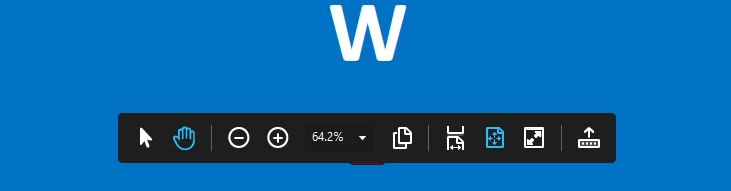
This has never appeared before and I do not want it to do so.

How do I get it to stop appearing?


Thanks!
This topic has been closed for replies.
Correct answer Tariq Dar

Thank you for reaching out. 
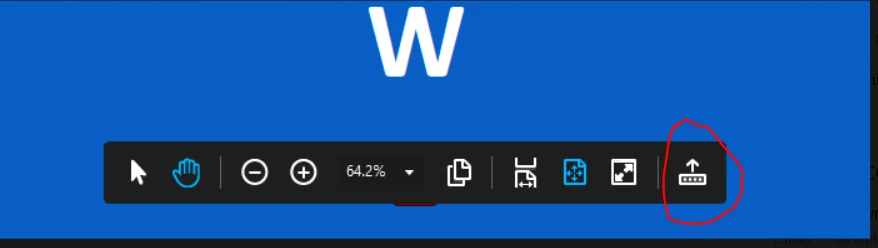
Adding to what @gary_sc said. Now with the latest release of Adobe Acorbat Pro DC you can dock it by clicking the icon on the far right on the screenshot you have attached. 


Let us know if that answers your question.

~Tariq


3 replies

Participant
April 20, 2023

Please help. I cannot get rid of this annoying black bar. It gives me no options to do so. See screenshot.


Souvik Sadhu
Community Manager
Community Manager
April 24, 2023

Hi @Ntuthuko5FCC,


Hope you are doing well. Sorry for your experience with Acrobat.


Since Acrobat Sign has now moved to a web-based service where your documents are uploaded to the server for you to prepare and send, I suggest clearing the web caches and cookies for your devices and then checking.


I tried reproducing the issue at my end but got the cross icon on the right to hide the tools.


You can learn more about clearing cache: Clear cache & cookies - Computer.


You can also check if you experience the same on the web: https://acrobat.adobe.com/link/documents/


Please run the latest application version for better results (go to Help-> Check for Updates).


-Souvik.

Tariq DarCorrect answer
Legend
February 12, 2021

Thank you for reaching out. 
Adding to what @gary_sc said. Now with the latest release of Adobe Acorbat Pro DC you can dock it by clicking the icon on the far right on the screenshot you have attached. 


Let us know if that answers your question.

~Tariq


gary_sc
Community Expert
Community Expert
February 12, 2021

That's a HUD (Heads Up Display). It appears when you are looking at a pdf in a browser. If you want it to do away, move your cursor off the screen and/or away from the region of the HUD. Also note you can move it around by clicking and dragging it around.


But you cannot get rid of it, those are your controls for PDFs in Browsers.