
Participant
May 5, 2020
Answered

How to get rid of blue line and name in acrobat pro dc

  • May 5, 2020
  • 1 reply
  • 7259 views

Hi

I use the Request Signatures feature in Acrobat Pro DC and I want to get rid of the blue line, name and date underneath the signature. I've looked at preferences and I could not see anything that would allow me to turn that off.


Thanks
 

Correct answer Amal.

Hi John


Please try the following steps and see if that works for you.


  • Sign in to your Adobe Sign account at https://documents.adobe.com/.
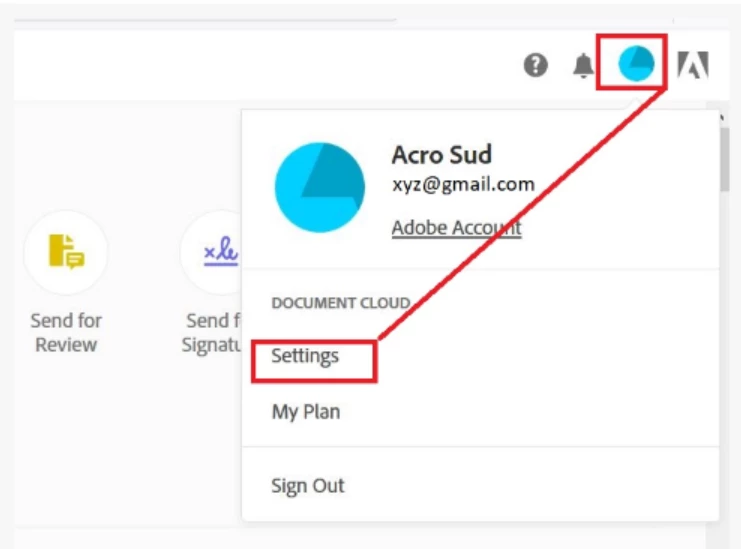
  • In the upper-right corner, click the Profile icon and then click Settings.
  • Navigate to Edit Signature Settings
  • Navigate to Account Settings Signature Preferences.
  • To enable the feature, select the Use well-formatted signatures and initials check box.
  • Save the changes.


Let us know how it goes


Regards

Amal

1 reply

Amal.
Community Manager
Community Manager
May 6, 2020

Hi there 


We are sorry for the trouble. As described you want to turn off the name and date underneath the signature.


We have checked your account details and found that you have an enterprise account. Please refer to the steps provided in the help article (https://helpx.adobe.com/sign/kb/to-enable-disable-name-date-below-the-signature.html) and see if that works.


Let us know how it goes


Regards

Amal

CF1965Author
Participant
May 6, 2020

Hi Amal


That does not seem to work for us. I use the fill and sign tool within Acrobat Pro DC and under settings/signature preference, I do not see the tick box for "Use well-formatted signatures and initials" as described in the article.


Thanks

John

Amal.
Community Manager
Amal.Community ManagerCorrect answer
Community Manager
May 8, 2020

Hi John


Please try the following steps and see if that works for you.


  • Sign in to your Adobe Sign account at https://documents.adobe.com/.
  • In the upper-right corner, click the Profile icon and then click Settings.
  • Navigate to Edit Signature Settings
  • Navigate to Account Settings Signature Preferences.
  • To enable the feature, select the Use well-formatted signatures and initials check box.
  • Save the changes.


Let us know how it goes


Regards

Amal