


Participant
January 19, 2021
Question

How to get rid of the Adobe PDF *.joboptions error?

  • January 19, 2021
  • 3 replies
  • 1490 views

Few times a day I get this odd window that pops up on my screen. I don't know how to get rid of it. To close it I just need to press Ok 2 times. Can please someone help me how to solve this problem?
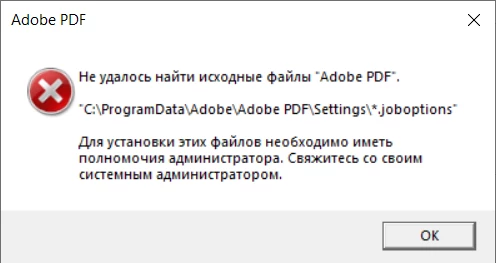
It says the next:


Could not find source files "Adobe PDF".

"C:\ProgramData\Adobe\Adobe PDF\Settings\*.joboptions"

You must have administrator privileges to install these files. Contact your system administrator.

-----------------------------------------------------------------------

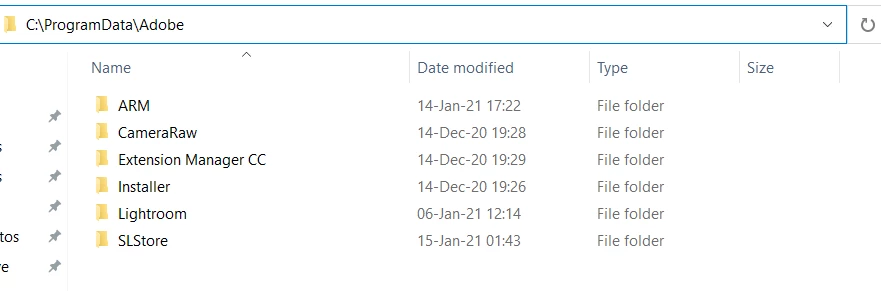
Also when I tried to find that Adobe PDF folder it didn't even exist =\
 

3 replies

Participant
September 16, 2026
C:\ProgramData\Adobe\Adobe PDF\Settings>dir /ah /q /x
Volume in drive C is OSDisk
Volume Serial Number is 92D0-9FED

Directory of C:\ProgramData\Adobe\Adobe PDF\Settings

03/17/2015 02:34 32,217 HIGHQU~1.JOB BUILTIN\Administrators High Quality Print.joboptions
03/17/2015 02:34 33,734 OVERSI~1.JOB BUILTIN\Administrators Oversized Pages.joboptions
03/17/2015 02:34 51,513 PDFA1B~1.JOB BUILTIN\Administrators PDFA1b 2005 CMYK.joboptions
03/17/2015 02:34 51,499 PDFA1B~2.JOB BUILTIN\Administrators PDFA1b 2005 RGB.joboptions
03/17/2015 02:34 48,950 PDFX1A~1.JOB BUILTIN\Administrators PDFX1a 2001.joboptions
03/17/2015 02:34 48,692 PDFX32~1.JOB BUILTIN\Administrators PDFX3 2002.joboptions
03/17/2015 02:34 30,098 PRESSQ~1.JOB BUILTIN\Administrators Press Quality.joboptions
03/17/2015 02:34 32,682 SMALLE~1.JOB BUILTIN\Administrators Smallest File Size.joboptions
10/05/2021 02:44 31,455 STANDA~1.JOB BUILTIN\Administrators Standard-Classic.joboptions
10/05/2021 04:44 30,607 STANDA~2.JOB BUILTIN\Administrators Standard.joboptions
10 File(s) 391,447 bytes
0 Dir(s) 216,816,869,376 bytes free

C:\ProgramData\Adobe\Adobe PDF\Settings>


Anand Sri Bhattacharya
Community Manager
Community Manager
September 17, 2026

Hello @David B Spalding,


I hope you are doing well, and thanks for reaching out. Sorry for the trouble you had.


That dialogue is Acrobat telling you it cannot install or read the Adobe PDF printer's conversion-preset files (the .joboptions presets like Standard, High Quality Print, Press Quality) into C:\ProgramData\Adobe\Adobe PDF\Settings, and it does not have the rights to write them there. Adobe documents that these presets live in exactly that ProgramData\Adobe\Adobe PDF location (and that the default files are hidden and read-only), so the message is about those printer resource files, not your document.


Run Acrobat as an administrator, then repair. Right-click your Acrobat shortcut > Run as administrator, then Menu > Help > Repair installation, and reboot. Running it elevated lets Acrobat write the missing files into ProgramData, which is precisely what the "must have Administrator privileges" line is complaining about. Repair is also Adobe's first recommended step for Adobe PDF printer resource problems.


Install the Microsoft Visual C++ Runtime and reboot. Check this article for more details: https://adobe.ly/4heLNvV

Check the folder permissions. Make sure your account has Modify/Write access to C:\ProgramData\Adobe\Adobe PDF\Settings (turn on "show hidden items" to see it). If the Settings folder is missing or empty, recreate it; an elevated Repair (step 1) should repopulate the default .joboptions.

Re-add the Adobe PDF printer if it has gone missing, using the manual steps in Adobe's "Adobe PDF printer is missing" KB: https://adobe.ly/4yIph5x


Ensure that the OS is updated and all the mandatory and optional updates are installed.


Let us know how it goes, and please reach out if you need any help or have any questions.

Regards,

Anand Sri.

Participant
September 16, 2026

I have this very same issue. Running Acrobat 26.1 according to Creative Cloud.