

mary_n_fingerlakes
Inspiring
January 9, 2026
質問

How to Handle Comments from Other Reviewers in a Shared Review in Adobe Acrobat

  • January 9, 2026
  • 返信数 1.
  • 198 ビュー

Hi! My company uses the Shared Review functionality in Adobe Acrobat, Version 2025.001.20997.


One of our offsite colleagues connects to the network via VPN. When he clicks Publish Comments, the following message displays:
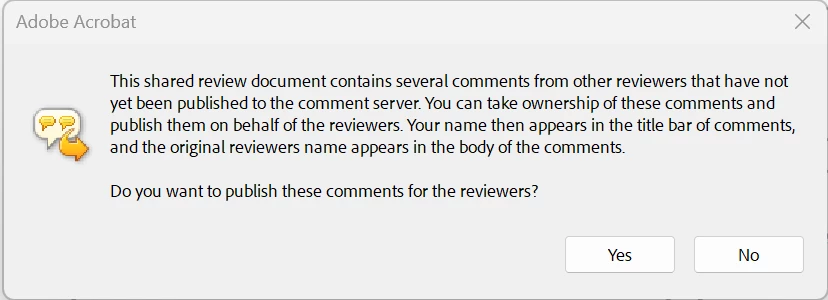
mary_n_fingerlakes_0-1767989316691.png

He clicks No and then the following mesage displays:
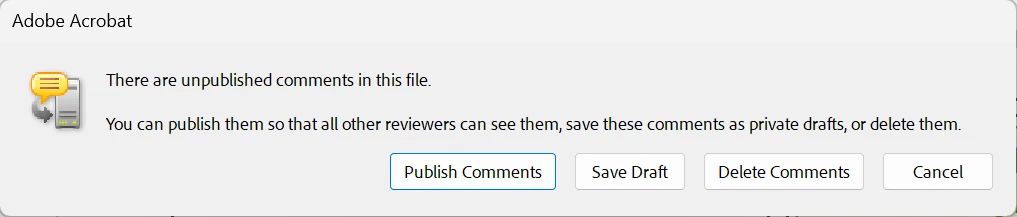
mary_n_fingerlakes_1-1767989557332.png

He is not sure how to handle these messages. My suspicion is that he should click Yes in the first dialog box since other reviewers may have the document open at the same time. Is there any way to avoid getting this message or is it standard when working in a shared review?


I've read through some posts and found that VPN may cause issues with the shared reviews. I am not sure if that is what is happening here.


Is this a known issue and if so, does anyone know of any workarounds? Any clarification or feedback would be very much appreicated. 


Thank you!

返信数 1

Randy Hagan
Community Expert
Community Expert
January 9, 2026

It's more a matter of your remote reviewer attaching comments to the document under review.


"Publishing" comments adds your remote worker to the list of comments associated with the document — it identifies your remote reviewer as the person who made comments, and associates his identified review comments to the document presented for review. TL;DR — yes your reviewer should click the Yes button, and if he misses, he should click the Publish Comments button to add his review to the relevant document. It just adds him to the list and may give him access to the comments others have made to the document.


You can read more about what publishing comments does through the following link:


https://helpx.adobe.com/acrobat/desktop/share-and-review-documents/manage-reviews/publish-comments.html


Forwarding that link may put him at ease.


Hope this helps,


Randy

mary_n_fingerlakes
Inspiring
January 9, 2026

Hi @Randy Hagan - thank you for the quick response. I'll give him these tips and hopefully we can avoid any issues in the future. 


Randy Hagan
Community Expert
Community Expert
January 9, 2026

To be fair, the text in those alert boxes isn't artfully phrased. I may go as far as say it instills fear rather than useful information. The link explains what's actually happening though, and should put him at ease.


Glad I could help. And if you have any issues in the future, feel free to come back and sound the alarm. There are lots of sharp folks around here who may be able to lend a hand.


Good luck,


Randy