Inspiring
September 22, 2024
Question

how to have a single text box

  • September 22, 2024
  • 2 replies
  • 792 views

Hello,

I have made a scan with OCR with acrobat pro.

But here is the result :
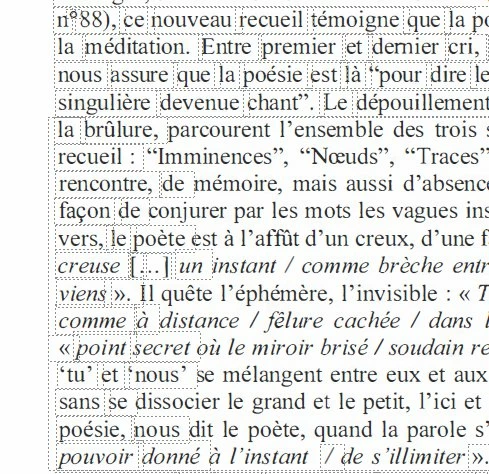
 

You can see that on this page, I have several text boxes.

How to merge all these text boxes in a single text box ?

This topic has been closed for replies.

2 replies

Inspiring
September 22, 2024

I have just seen that my problem is coming from the acrobat pro OCR : 

1) if I use acrobat pro with OCR to scan the page, the problem is here (several text box on the page).

2) if I use another app with OCR to scan the page : the problem disappears (I have now a single text box for all the page).

Why the OCR in acrobat pro is not working well ?

Adobe Employee
September 25, 2024

Hi @pierret18811376 

Sorry for the inconveneince caused to you. Will it be possible for you to share scanned document with me to investigate the issue in detail.


Thanks,

Shakti K

Inspiring
September 25, 2024

Hi @shaktikeshri 

I have just sent you a private message.

try67
Community Expert
Community Expert
September 22, 2024

Not possible.

Inspiring
September 22, 2024

So I cannot edit this PDF, because if I put my cursor at the end of a text box on this page, and if I write some text, the text I am writing is going over the following text (text overlap). So there is no solution ?