


Participant
July 6, 2023
Answered

How to Hide Left Toolbar in ADOBE Acrobat Pro version 2023.003.20215

  • July 6, 2023
  • 3 replies
  • 6015 views

All,

How do I get rid of left Toolbar in ADOBE Acrobat Pro version 2023.003.20215

Hide toolbar option no more available in View I have also tried  Edit > Preferences > Documents> Restore last view.... not working 
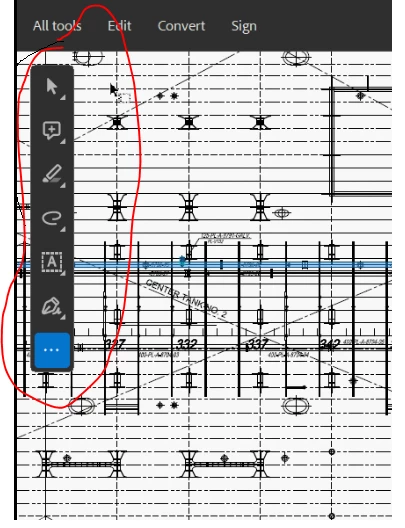
Correct answer Bernd Alheit

Try this:

disable the new UI

3 replies

Amal.
Community Manager
Community Manager
September 13, 2023

Hi All,


Hope you are doing well.


The option to move the toolbar around the document is now available with the new version 23.06.20320. Please update the application from the help menu > check for updates and reboot the computer once.


Hope it will help.


Regards

Amal

Participant
October 14, 2023

Having it move around doesnt help much.

Just allow it to be docked with the other toolbars at the top and get it out of the way.

While were on it, there's a tool panel to the right as well, please just put it all in one space (top or botom or side options would be good).

Additionally, when we use the 'save as' feature, can we please have the option for it to always come up as 'choose different folder'. Otherwise its just added steps.I'm sure some would enjoy saving to recent folders but I hardly ever do.

For something that we're paying for I would expect it to become more streamline than less so with time

Amal.
Community Manager
Community Manager
October 16, 2023

Hi there


We are sorry to hear that. Please share your feedback with the engineering team using the link https://www.adobe.com/products/wishform.html


~Amal

Participant
July 6, 2023

Thanks Bernd . This works 

Participant
September 13, 2023

How do you disable the UI?

Bernd Alheit
Community Expert
Bernd AlheitCommunity ExpertCorrect answer
Community Expert
July 6, 2023

Try this:

disable the new UI

Participant
December 28, 2023

Hello out there,

can anyone please explain how to disable the new UI?

Thanks in advance

Participant
December 28, 2023

Okay, got it, thanks