Participant
August 11, 2025
Answered

How to make a Number Field in a fillable form

  • August 11, 2025
  • 2 replies
  • 577 views

I see options for a text field and a bunch of other options like radio buttons or date but I don't see a number option.

googled and tutorials from 2+ years ago say to go to format tab in properties but this doesn's seem to exist anymore, atleast not in the PC version in 2025


Are number fields just gone? Am I blind?

Correct answer Thom Parker

You seem to be in the wrong mode.  There are two modes when adding form fields in the "Prepare Forms" tools. Regular AcroForm mode and Adobe Sign mode.  If you selected signatures when first using these tools, you are in Adobe Sign mode.  Acrobat is not very clear on these things, but it's easy to change back. 


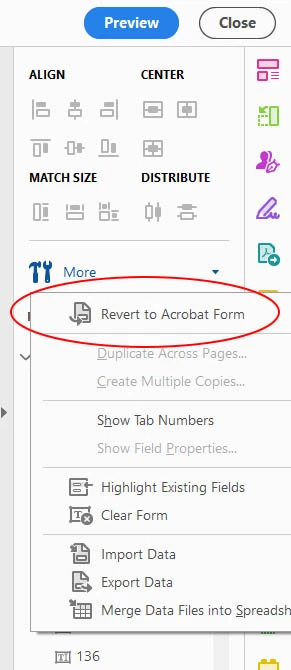
Go to the "More..." drop menu and select "Revert to Acrobat Form"


2 replies

Thom Parker
Community Expert
Thom ParkerCommunity ExpertCorrect answer
Community Expert
August 11, 2025

You seem to be in the wrong mode.  There are two modes when adding form fields in the "Prepare Forms" tools. Regular AcroForm mode and Adobe Sign mode.  If you selected signatures when first using these tools, you are in Adobe Sign mode.  Acrobat is not very clear on these things, but it's easy to change back. 


Go to the "More..." drop menu and select "Revert to Acrobat Form"


Thom Parker - Software Developer at PDFScriptingUse the Acrobat JavaScript Reference early and often
try67
Community Expert
Community Expert
August 12, 2025

That's also outdated, unfortunately...


If you're using the new Acrobat UI go to Tools and search for "Prepare Form", then click the "three dots" icon next to "Prepare a Form" on the left-hand panel and then on "Remove e-signing options".

In the future, when creating the form for the first time do not tick the box that says "This document requires signatures", as it converts it to an Adobe Sign form, which has limited functionality.

PDF Automation Station
Community Expert
Community Expert
August 11, 2025

Number fields are text fields formatted as numbers in the format tab of the field properties.  If you can't see the format tab you probably selected "This form requires signatures" when you prepared the form.  In form editing mode select More > Revert to Acrobat form from the field panel