Participating Frequently
June 20, 2023
Question

How to make a values in a textbox not more than the other
  • June 20, 2023
  • 1 reply
  • 441 views

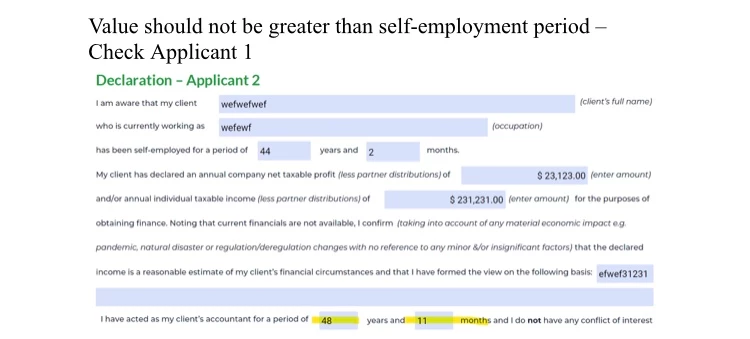
 how can i format the text field where 48 & 2 is typed such that it won't accept any value greater than what is typed in that text field where 44 & 11 is typed?

This topic has been closed for replies.

1 reply

try67
Community Expert
Community Expert
June 20, 2023

This is tricky. Even if you did it, what if the user went back and edited the first field(s) after entering a value in the second ones? You would need to either re-do the validation, or reset the second set of fields each time the first ones are edited. Also, the fact each value is split into two fields doesn't help... What if the user enters "48" and "2" in the first set, then enters "48" in the first field of the second set? Should that be accepted? What if they then enter "6" in the second field? Should it be rejected, and the first field of that set cleared as well, or just the second field? etc.

taubzAuthor
Participating Frequently
June 20, 2023

Yes, the user would have to either re-do the validation, or reset the second set of fields each time the first ones are edited. The first set determines what should be typed in the second set & also both fields in the second set must be filled as long as both fields in the first set is filled. The first field ultimately determines the input in the second field. The duration (Year & Month) in the second field must not be more than the duration (Year & Month) in the first field.

try67
Community Expert
Community Expert
June 21, 2023

You can use something like this as the custom Validation script of the second month field:


if (event.value) {
	var year1 = this.getField("Year1").valueAsString;
	var month1 = this.getField("Month1").valueAsString;

	if (year1=="" || month1=="") {
		app.alert("You must first enter the first period.");
		event.rc = false;
	} else {
		var year2 = this.getField("Year2").valueAsString;
		if (year2=="") {
			app.alert("You must first enter the years for this period.");
			event.rc = false;
		} else {
			var month2 = event.value;
			var duration1 = Number(year1) + Number(month1)/10;
			var duration2 = Number(year2) + Number(month2)/10;
			if (duration2>duration1) {
				app.alert("Error! The second period can not be longer than the first.")
				event.rc = false;
			}
		}
	}
}


With a few adjustments this code can also be used for the year field, although in that case you probably don't want to check that the months field is empty.

As the custom Validation of the fields in the first group enter this:


if (event.value) this.resetForm(["Year2", "Month2"]);


Adjust all field names in the code to match the actual ones in your file, of course.