


AcmeCoffeeRN
Participating Frequently
April 9, 2015
Answered

How to make home screen goes away after closing PDF file in Acrobat DC?

  • April 9, 2015
  • 55 replies
  • 43042 views

I just updated Acrobat DC on a Mac. It works fine except the most annoying part is home screen is always there after you view and close any PDF documents. So every time you close a PDF file, you have to press command+w on keyboard twice to close the windows. Very unproductive and annoying. Anyone has any tip in getting rid of the home screen or home workspace? Thanks.

    This topic has been closed for replies.
    Correct answer JR Boulay

    The same in English language.

    55 replies

    Participant
    October 16, 2015

    Ah ha! I uninstalled it, then re-installed. It worked!!!

    WEEEE!

    Thanks!

    Participating Frequently
    October 16, 2015

    FINALLY!!!!! What an idiot move Adobe.

    Really points out that Adobe, Apple, et al are dumbing down more and more to make these PRO apps "easier" for lay folks like my mother to use.

    dennis.wolfers
    Participant
    October 20, 2015

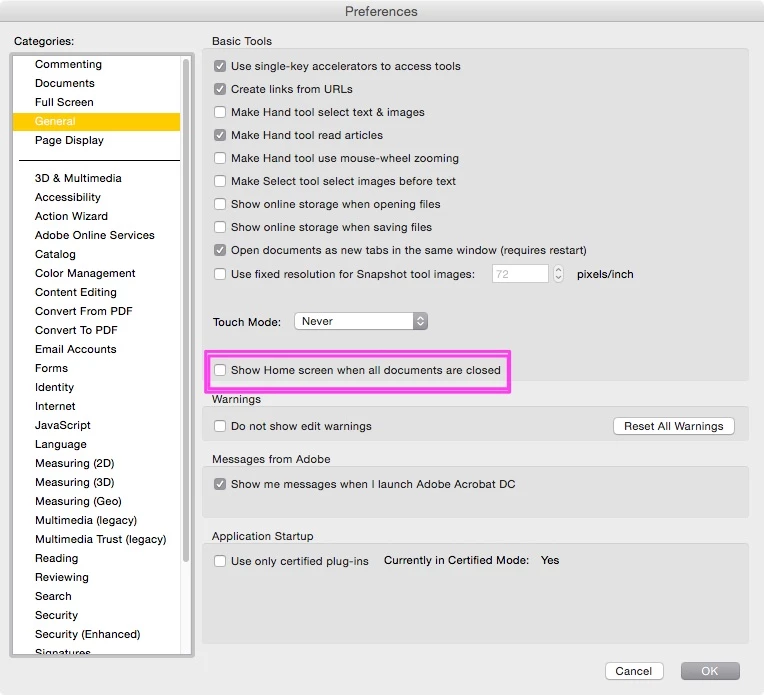
    The day after I posted my Feature Request, I got a cordial email informing me that there is now a checkbox in the General preferences which dismisses the Home window when all documents are closed. I was admonished not to be too hasty in banishing the oh-so-valuable Home window, and reminded of it's many virtues before being told how to do it. It wasn't there when I looked yesterday, but appeared this morning. Having selected it, I now only see the Home window when I close the only open document by clicking the 'X' in the document tab. I replied to the email informing Adobe of the remaining behavior inconsistency.

    Did Acrobat have document tabs before today? I don't know, but now all my documents open in tabs rather than separate windows, and there is a (new?) preference checkbox to toggle this behavior. Will the surprises never end?

    So, Adobe does listen, and respond (after a fashion).

    Now if we could just have the lovely, reliable, streamlined apps that we all dream of, without the rampant feature-bloat, thank you very much!

    Participating Frequently
    October 16, 2015

    Yey! I'm glad that this was done.

    MathPoli
    Participating Frequently
    October 16, 2015

    GOOD NEWS: Adobe has just updated Acrobat and added a check button to enable/disable the start window!

    JR Boulay
    Community Expert
    JR BoulayCommunity ExpertCorrect answer
    Community Expert
    October 16, 2015

    The same in English language.

    Acrobate du PDF, InDesigner et Photoshopographe
    Participant
    October 16, 2015

    great, where can i download this? i just checked and my Creative Cloud doesn't show any apps that need updating.

    Inspiring
    October 15, 2015

    I can understand the annoyance when dumb software "features" are put in place. It amounts to an unwanted, unnecessary distraction when using a product that had been working fine for years.

    However, it further bothers me that, to get rid of the dumb software decision, myself and many others are seemingly required to post a multitude of negative responses that somehow create the impression that there is enough interest in making a change, almost as if a kind of "voting" were taking place.

    In my mind, it is absurd to consider forums, or bug reports, or any kind of social media, as voting. In the final analysis, it should be fairly common sense that the dumb software decision is dumb, and that the issue should be fixed without excessive delay. And it should have been enough for *one* person to point this out.

    I invite software developers and Q/A to understand that many people, not having the time to persistently post to forums, can see that someone else already complained about their issue, so there is no apparent need to make further forum comments on the matter. This is not to say that I discourage extra forum comments. Instead, I am saying that Adobe should have acted from the outset (i.e., the very first complaints), rather than ignore the issue.

    Participating Frequently
    October 15, 2015

    You're completely right of course Beaver, but we're all guilty of making the assumption that Adobe gives a damn.  I am continually frustrated by the ludicrous situation which will only import an image form another Adobe software package as a 72 dpi representation of the image you copied.  So, every time I copy an image from InDesign or Illustrator (of which I do an awful lot) I have to first change the size of the window from pixels to cm, then from 72 dpi to 300 dpi.  EVERY single time!  Complaining to Adobe is a complete waste of time, whether you do it in a positive or negative tone. Whenever I get frustrated with Adobe products, I always work with Microsoft Office for a few minutes. Suddenly Adobe seems wonderful again. In fact they should start using that as their strap line: "ADOBE: we're not quite as crap as Microsoft".

    Participant
    October 15, 2015

    The only thing we can do is COMPLAIN TO THE COMPANY!!!!

    Go to this link below: If enough people do it, they'll fix it! At least give us the option to turn the stupid window off!!

    Feature Request/Bug Report Form

    dennis.wolfers
    Participant
    October 15, 2015

    I agree! I just submitted mine.

    Known Participant
    October 13, 2015

    HEY ADOBE!!

    This is RIDICULOUS.  Don't make us close the window TWICE.  Your hard core users are crankin out files and making pdfs... this is an ABSURD extra stroke in our workflow.  Training us to hit command-w command-w is nuts.  I use Acrobat all day everyday... making pdfs in my designer workflow.  I NEVER USE THE PREVIOUS FILE WINDOW.  There is ZERO chance that it would be more effective.  It is an OBSTACLE.   FIX THIS!!!

    dennis.wolfers
    Participant
    October 6, 2015

    Is anybody at Adobe listening?

    GET RID OF THE Fµ¢#ING 'HOME' WINDOW!

    (or at least give me a way to disable it)

    00rhodiad
    Participating Frequently
    October 6, 2015

    For what it's worth (at least on the Mac) if, when you close your PDF, you manually close the WINDOW (hit the red "x" button rather than Command-W) then the Home browser does go away with the closing PDF. Of course if you're busy enough to be annoyed by the Home interruption, you're probably using key-commands, and having to manually close a window for no good reason is nearly as annoying.

    WORKAROUND: Command-W does get rid of the Home window, so I've gotten into the habit of hitting it twice: Command-W-W. (Not the best habit—it's annoying when I accidentally W-W in another app.)

    This Home thing is potentially helpful, I guess. If, say, after closing a PDF, you usually want to reopen a recent file. But if you on average do anything else, it's just plain annoying. Obvious solution? Adobe should add a preference so that a user can disable it. And I'd recommend they make it be off by default unless they can come up with a FUNCTION for it to serve that a majority of users want in front of them most every time that they close a document. That's just common sense and UI 101.

    More bizarrely, there's no "Window > Home" menu option. So this feature that Adobe felt was so critical that they needed to push it at you continually and repeatedly—once you close it, unless I'm missing something, there's no way to get it back other than opening a new file. Why not, if the preference to "show home screen when no file is open" is set to "on," then have the Home browser show up when you switch to the app with no file open? That'd be by far the most useful time to see it. (Though again, make sure the "off" preference keeps this from happening, too.)

    Basically, it's fine if it's there. I don't mind it when it's not getting in the way. But if I find that it's annoying or not useful for me, please LET ME TURN IT OFF!

    Inspiring
    October 7, 2015

    More bizarrely, there's no "Window > Home" menu option. So this feature that Adobe felt was so critical that they needed to push it at you continually and repeatedly—once you close it, unless I'm missing something, there's no way to get it back other than opening a new file. Why not, if the preference to "show home screen when no file is open" is set to "on," then have the Home browser show up when you switch to the app with no file open? That'd be by far the most useful time to see it. (Though again, make sure the "off" preference keeps this from happening, too.)

    Well, you mention working on a Mac. The thing is, you can keep Acrobat in the Dock, such that clicking clicking Acrobat in the Dock would open the MRU list.

    It's still fundamentally useless because the MRU is a dangerous way to unintentionally modify a crucial original file. I just can't take the chance using it, and it's annoying that an option has not been provided to turn it off.

    00rhodiad
    Participating Frequently
    October 7, 2015

    Ah, you're right! Guess I use the dock for app switching about as seldom as I use the "x" button to close a window. Which is still probably more than I use a MRU list.

    And I probably shouldn't have mentioned it in the first place. Now, instead of adding a preference to avoid it, someone will "fix" the "bug" that's keeping the Home window from showing up when you switch to Acrobat using Command-Tab.

    Participating Frequently
    October 2, 2015

    Just for the record and if Adobe personnel ever take a look at the forums (I won´t bother with another useless feature request again):

    I got tired of this (and other stupid "enhancements" in the latest version) and downgraded too.

    Participant
    September 30, 2015

    This needs to gooooo away. Complete useless function! PLEASE ADOBE!