Participating Frequently
Jan 10, 2025 7:23 PM UTC
Answered

How to manually override a calculation fillable forms

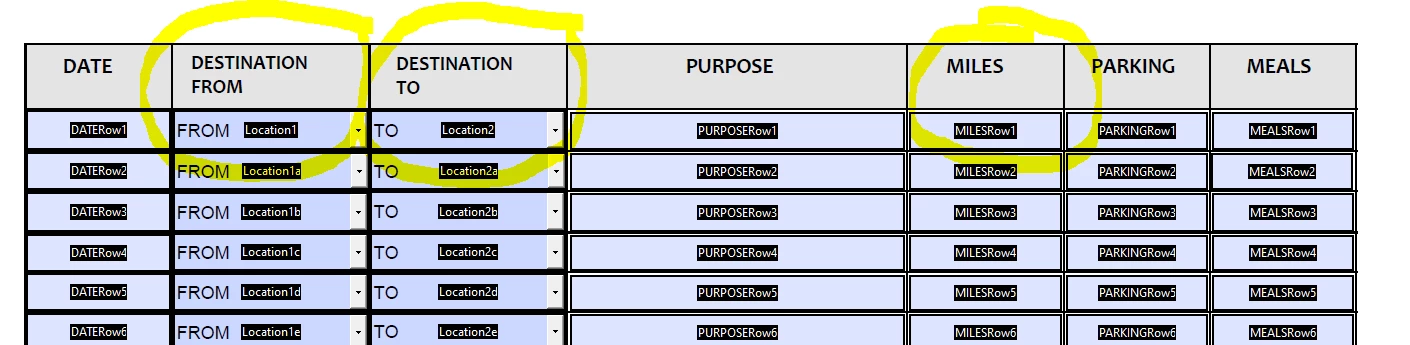
I can auto-calculate the miles in my fillable form using the table and script below. However, I want them to be able to select an "other" as an option in the drop-downs (putting an explanation in the purpose column) so they can manually input their own miles in the miles column. How can I do that? 
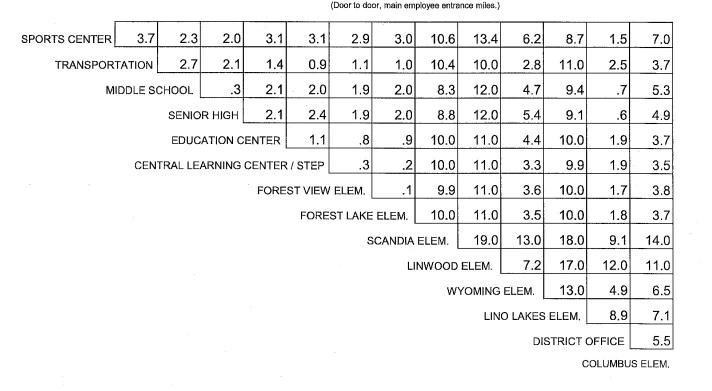
 

var Loc1=this.getField("Location1").value;
var Loc2=this.getField("Location2").value;
if((Loc1=="Sports Center" && Loc2=="Transportation")||(Loc1=="Transportation" && Loc2=="Sports Center"))
{event.value=3.7} else
if((Loc1=="Sports Center" && Loc2=="Middle School")||(Loc1=="Middle School" && Loc2=="Sports Center"))
{event.value=2.3} else
if((Loc1=="Sports Center" && Loc2=="Senior High")||(Loc1=="Senior High" && Loc2=="Sports Center"))
{event.value=2.0} else
if((Loc1=="Sports Center" && Loc2=="Education Center")||(Loc1=="Senior High" && Loc2=="Sports Center"))
{event.value=3.1} else
if((Loc1=="Sports Center" && Loc2=="Central Learning Center/STEP")||(Loc1=="Central Learning Center/STEP" && Loc2=="Sports Center"))
{event.value=3.1} else


etc... 


Thom Parker
Thom ParkerCorrect answer
Community Expert
Jan 11, 2025 3:22 AM UTC

Is this what you mean? It doesn't work. I'm very new to this, so understanding takes a bit. Thank you for being so patient and helping me. 

var Loc1=this.getField("Location1").value;
var Loc2=this.getField("Location2").value;
event.rc = Loc1 != "OTHER";
event.rc = Loc2 != "OTHER";
event.rc = (Loc1 != "OTHER") || (Loc2 != "OTHER");
if((Loc1=="Sports Center" && Loc2=="Transportation")||(Loc1=="Transportation" && Loc2=="Sports Center"))
{event.value=3.7} else
if((Loc1=="Sports Center" && Loc2=="Middle School")||(Loc1=="Middle School" && Loc2=="Sports Center"))
{event.value=2.3} else
if((Loc1=="Sports Center" && Loc2=="Senior High")||(Loc1=="Senior High" && Loc2=="Sports Center"))
{event.value=2.0} else


Use this code:

var Loc1=this.getField("Location1").value;
var Loc2=this.getField("Location2").value;
event.rc = (Loc1 != "OTHER") || (Loc2 != "OTHER");

if((Loc1=="Sports Center" && Loc2=="Transportation")||(Loc1=="Transportation" && Loc2=="Sports Center"))
    {event.value=3.7} 
else if((Loc1=="Sports Center" && Loc2=="Middle School")||(Loc1=="Middle School" && Loc2=="Sports Center"))
    {event.value=2.3} 
else if((Loc1=="Sports Center" && Loc2=="Senior High")||(Loc1=="Senior High" && Loc2=="Sports Center"))
    {event.value=2.0} 


The code must not end with a hanging "else". This will cause an error that will prevent the code from running. 

Also, "OTHER" must match the selection text exactly, including case. 


If the code doesn't work there may be an error somewhere. Errors are reported in the Console Window. Press (Ctrl-J).

Good Luck,


Thom Parker - Software Developer at PDFScriptingUse the Acrobat JavaScript Reference early and often

10 replies

Thom Parker
Community Expert
Community Expert
Jan 10, 2025 9:06 PM UTC

The form could also benefit from proper table naming. This would allow you to generalize the scripts. 

For example "Row1.Location1",  "Row2.Location1", etc. 


Translate
Thom Parker - Software Developer at PDFScriptingUse the Acrobat JavaScript Reference early and often
Thom Parker
Community Expert
Community Expert
Jan 10, 2025 9:03 PM UTC

There are several ways to block a calculation. 

But the simplest is to use the event.rc value in the calculation script. 

Add this line to the top of the miles calculation code.


event.rc = Loc2 != "Other";


this could also be an "if" condition if you want to keep the calculation from proceeding. The only reason to do this is if the calculation takes time or affects other fields. 


if(event.rc = (Loc1 != "Other))

{

    full calculation script

}


Translate
Thom Parker - Software Developer at PDFScriptingUse the Acrobat JavaScript Reference early and often
lori_9412Author
Participating Frequently
Jan 10, 2025 9:45 PM UTC

This worked! Thank you - 

What could I do if they select OTHER in the Destination From column but select one of the dropdown options in the Destination To column. It won't allow me to override the miles. It only works if they select "OTHER" in both the From and To column.

Translate
Thom Parker
Community Expert
Community Expert
Jan 10, 2025 10:10 PM UTC

It's just a variation in logic.  


event.rc = (Loc1 != "Other") || (Loc2 != "Other");


This code blocks if "Other" is selected in either dropdown. 


Translate
Thom Parker - Software Developer at PDFScriptingUse the Acrobat JavaScript Reference early and often
Nesa Nurani
Community Expert
Community Expert
Jan 10, 2025 9:03 PM UTC

If user don't use dropdowns (Loc1 and Loc2) to input miles, you can use event.source like this:

if (event.source && (event.source.name=="Location1" || event.source.name=="Location2")) {
//put your script here between blue curly brackets
}


It will update the calculation only when dropdowns are interacted with.

Translate