roadazionacidao
February 16, 2026
Answered

How to preserve clickable website URLs when saving a certified PDF?

  • February 16, 2026
  • 2 replies
  • 5 views

I've noticed that if I take a PDF with clickable website URLs and then use Acrobat to save a certified copy (by selecting “E-Sign” and then “Save a certified copy”) , then afterwards the website URLs are no longer clickable. They are still formatted as URLs (blue colour and underlined), but they're no longer clickable.

Is there a way I can preserve clickable website URLs?

    Correct answer creative explorer

    @roadazionacidao Save a Certified Copy flattens evrying. Certify (Visible Signature) tool. You can find this under the main Certificates menu rather than the standard E-Sign sidebar.
     

    Certificates Menu


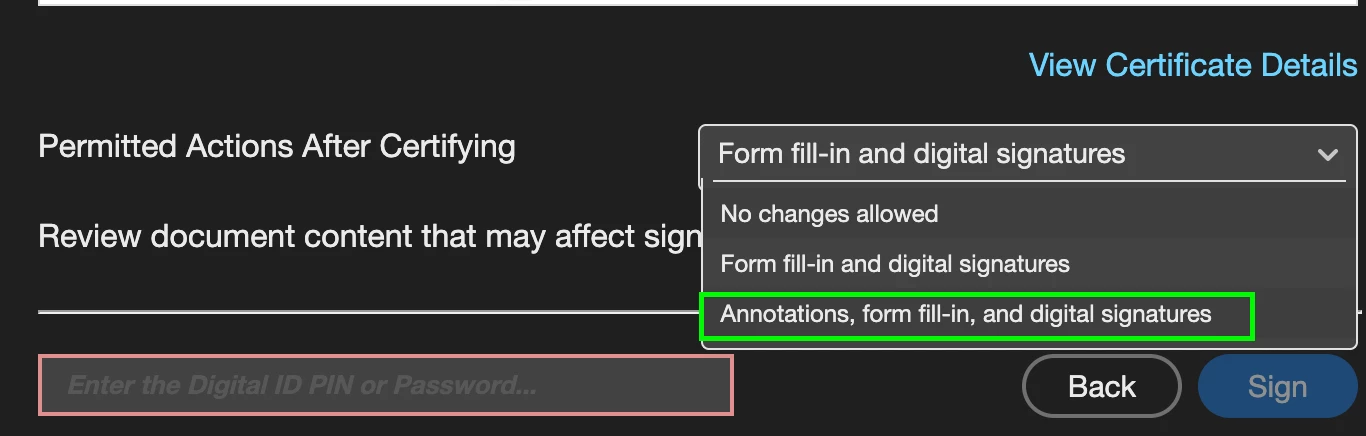
    Once you drag your signature box into place, keep a close eye on the "Permitted Actions" dropdown in the dialog box; you’ll want to select Annotations, form fill-in, and digital signatures — this would treat hyperlinks as a type of annotation
     

    Annotations, form fill-in, and digital signatures


    2 replies

    Meenakshi Negi
    Community Manager
    Community Manager
    February 17, 2026

    Hi roadazionacidao,


    Thank you for reaching out, and sorry for the trouble caused.


    This is a known issue, and the team is working on the fix. We will update you once the fix is available.

    We appreciate your patience.


    Thanks,

    Meenakshi

    creative explorer
    Community Expert
    creative explorerCommunity ExpertCorrect answer
    Community Expert
    February 17, 2026

    @roadazionacidao Save a Certified Copy flattens evrying. Certify (Visible Signature) tool. You can find this under the main Certificates menu rather than the standard E-Sign sidebar.
     

    Certificates Menu


    Once you drag your signature box into place, keep a close eye on the "Permitted Actions" dropdown in the dialog box; you’ll want to select Annotations, form fill-in, and digital signatures — this would treat hyperlinks as a type of annotation
     

    Annotations, form fill-in, and digital signatures


    m