


margareth99545653
Participant
July 24, 2024
Answered

How to prevent a pdf attachment converting to a link?

  • July 24, 2024
  • 3 replies
  • 1982 views

Everytime I try to send a pdf attachment in an email on my PC, it converts to a link. I furiously click on the conversion scale to the right of sceeen to prevent the action and only sometimes it stops. Then, when I try to send the email with the attachment, Adobe preventes me from so doing because "I have changed the email". This is so infuriating as my clients complain. I have tried two fixes I found on Google but neither worked. HELP, I'm at my wits end. This is entirely peculiar to mu PC, not my Mac.
Correct answer Tariq Dar

Hi @margareth99545653 @Margaret387857338mil 

Following up to check if this issue is fixed at your end. I checked at my end, and it works fine even on Mac.

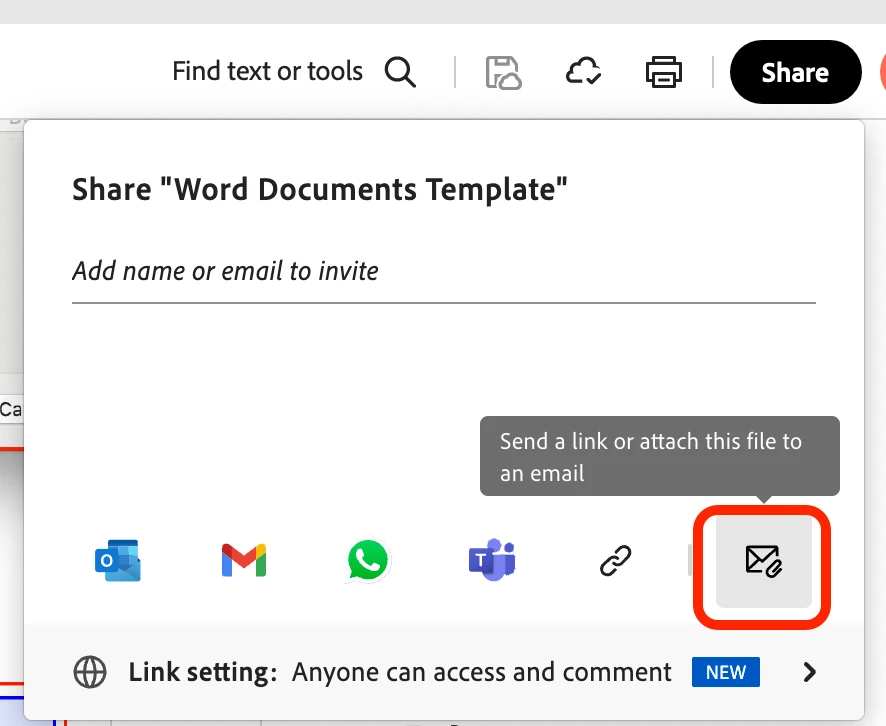
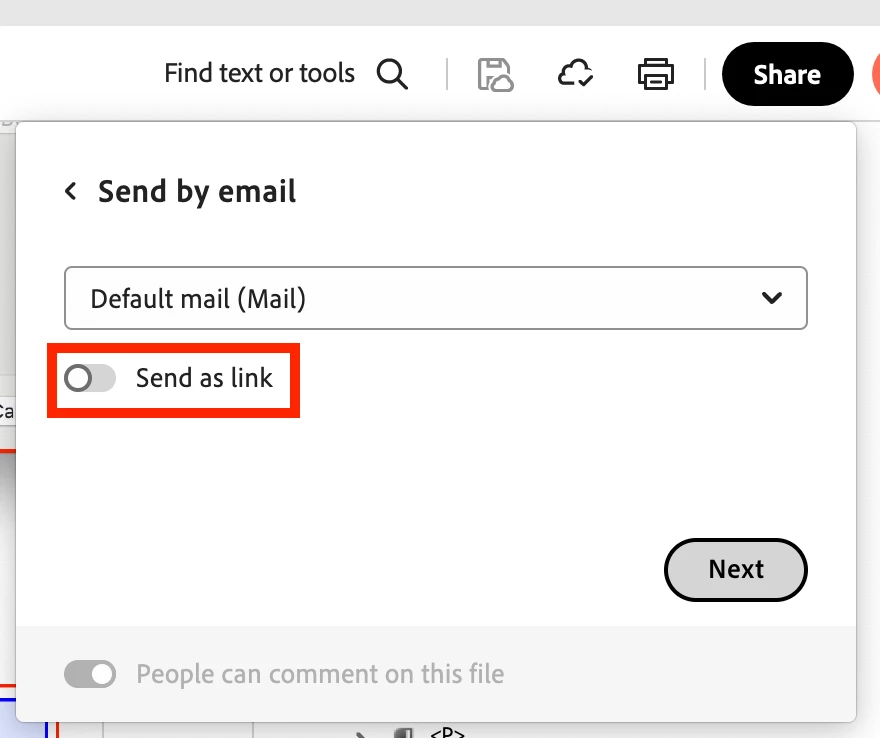
When you click on Share, choose the option to attach it with an email, and in the next window, ensure the "Send as link" is not enabled. 


Let us know if that helps.

~Tariq

3 replies

JR Boulay
Community Expert
Community Expert
August 2, 2024

Because it doesn't depend on Acrobat, it depends on your e-mail software.

Acrobate du PDF, InDesigner et Photoshopographe
Participant
August 18, 2024

Many thanks JR, it is working like a charm.

Thank you to everyone for your generosity and who shared your knowledge with me, making me more efficient.

If you lived closer, I'd bake you a cake.

Yesterday I baked an apple cake for the teen next door who mowed my lawn.

Thanks again

Margaret

JR Boulay
Community Expert
Community Expert
July 24, 2024

You must check your email software settings.

Acrobate du PDF, InDesigner et Photoshopographe
Participant
July 31, 2024

I did that. Why doesn't Adobe provide a fix?

Tariq DarCorrect answer
Legend
August 16, 2024

Hi @margareth99545653 @Margaret387857338mil 

Following up to check if this issue is fixed at your end. I checked at my end, and it works fine even on Mac.

When you click on Share, choose the option to attach it with an email, and in the next window, ensure the "Send as link" is not enabled. 


Let us know if that helps.

~Tariq

creative explorer
Community Expert
Community Expert
July 24, 2024

@margareth99545653 if it's fine on a MAC, then it must be the settings on a PC. Sorry, I work predomantely on a MAC, there MUST be an option to disable automatic conversion of attachments to links—check your email settings?

m
Participant
July 31, 2024

I tried a few of the email options separately and tested each one but none worked.