Participant
April 17, 2017
Answered

How to print 11 x 4.24 side by side vertical/portrait?

  • April 17, 2017
  • 1 reply
  • 1780 views

I am attempting to print 2 pdf pages on the same page, 11 x 4.25 vertical/portrait.

I've set pages per sheet to 2. When I select portrait it only prints in landscape at a 5.5 x 8.5 layout.
I have tried both vertical and horizontal and it will not print the correct way so far.

Thanks for your help

This topic has been closed for replies.
Correct answer Meenakshi_Negi

Hi patrickg54,

As you are trying to print PDF in an 11 x 4.25 layout, first you need to customise the paper size.

Please refer the steps provide below with the screenshots:

  • Open the PDF file and click on Print icon.
  • Select the printer from the list in the print dialogue box and click on Properties tab.
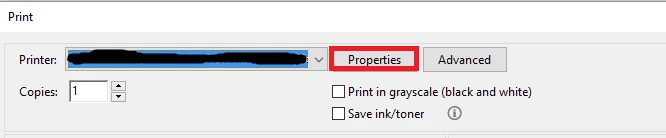
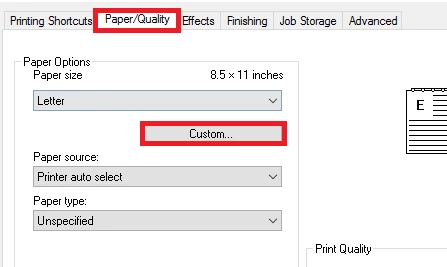
  • Go to Paper/Quality and under Paper size click on Custom > New.
  • Now name the custom paper size as per your wish. Then change the Width to 4.25 & length to 11.00.
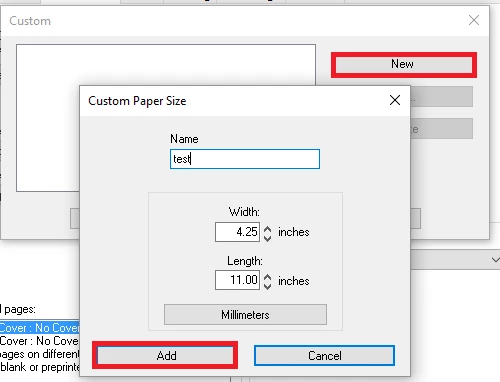
  • Click on "Add" and then "OK" to save settings.
  • Now, check if the customise size is selected under Paper options on printer properties window and then click "OK" below on that page
  • After selecting the paper size, click on Multiple tab under Page sizing & Handling and select the number of pages from the drop down for Page per sheet.
  • Then select the Portrait/Landscape under orientation as per your requirement.
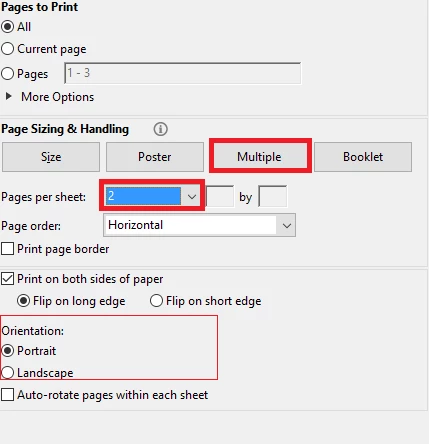
  • Now try to print the file and check if the output is as required.

Let us know if you need any help.

Regards,

Meenakshi

1 reply

Participant
April 18, 2017

So to reiterate, I can get the pdf to print two pages on one sheet, however only 5.5 x 8.5, I am trying to get the pdfs to print the long skinny way, vertical 11 x 4.25.

Meenakshi_Negi
Meenakshi_NegiCorrect answer
Legend
April 18, 2017

Hi patrickg54,

As you are trying to print PDF in an 11 x 4.25 layout, first you need to customise the paper size.

Please refer the steps provide below with the screenshots:

  • Open the PDF file and click on Print icon.
  • Select the printer from the list in the print dialogue box and click on Properties tab.

  • Go to Paper/Quality and under Paper size click on Custom > New.

  • Now name the custom paper size as per your wish. Then change the Width to 4.25 & length to 11.00.

  • Click on "Add" and then "OK" to save settings.
  • Now, check if the customise size is selected under Paper options on printer properties window and then click "OK" below on that page
  • After selecting the paper size, click on Multiple tab under Page sizing & Handling and select the number of pages from the drop down for Page per sheet.
  • Then select the Portrait/Landscape under orientation as per your requirement.

  • Now try to print the file and check if the output is as required.

Let us know if you need any help.

Regards,

Meenakshi

Participant
December 4, 2023

I am having this same problem - I understand following these steps in order to print one single 4.25x11 page.

But when trying to print multiple 4.25x11 pages on a single 8.5x11 sheet, is there a way to have the pages print vertically instead of horizontally? The pages seem to be printing the same whether Horizontal or Vertical is selected.