


Participant
May 12, 2018
Answered

how to print to pdf and open automatically?

  • May 12, 2018
  • 1 reply
  • 87301 views

in Windows 10, it is easy to "print to pdf", but is there a way to set the default so that the new pdf document always opens automatically?  In Word, using the "save as" function, and selecting pdf, there is a box that can be checked to achieve this - but can the same default be achieved by "print to pdf" rather than "save as"?  This would make it suitable to applications other than Word, like printing to pdf from iTunes.
Correct answer gkaiseril

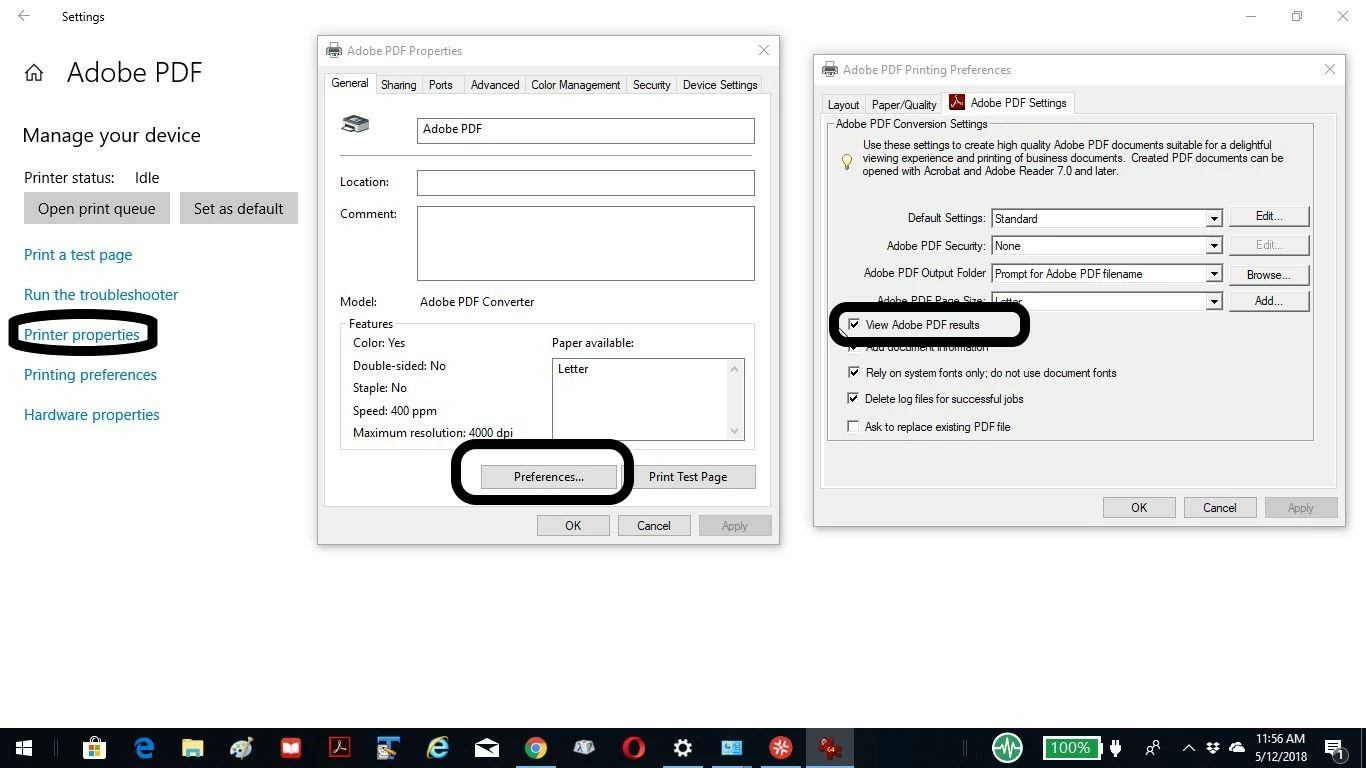
Using the Windows 10 control panel for Devices & Printers I can access the Adobe PDF printer and on the PDF Printer Preferences page there is an option to "View PDF Printer Results".

1 reply

gkaiserilCorrect answer
Inspiring
May 12, 2018

Using the Windows 10 control panel for Devices & Printers I can access the Adobe PDF printer and on the PDF Printer Preferences page there is an option to "View PDF Printer Results".

SFHOUAuthor
Participant
May 12, 2018

In Settings, there is not even an option for Adobe PDF - only "Microsoft Print to PDF" - there are no options to check a box anywhere from those choices

Legend
May 12, 2018

It sounds as if you have not paid for Acrobat. So you don’t have any Adobe software that can help you with this.  Acrobat is around $15 per month.