


Participant
April 1, 2024
Answered

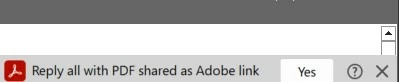
how to remove popup from outlook "Reply all with PDF shared as Adobe Link"

everytime i go into an email on outlook I get that notification on the side and it won't let me exit out of it (it blocks part of the message.  How can i get rid of it without removing adobe from outlook?
Kara23756662w2vhCorrect answer
Participant
April 10, 2024
You turn it off like this:
  1. Click File on the Outlook menu.
  2. Click Options on the File menu.
  3. Click Add-ins.
  4. Select COM Add-ins from the Manage drop-down.
  5. Click Go.
  6. Deselect Adobe Document Cloud for Microsoft Outlook - Acrobat.
  7. Click OK.

5 replies

Participant
December 5, 2024

THANK YOU!  That was so annoying.  Finally its gone.  

Translate
Kara23756662w2vhCorrect answer
Participant
April 10, 2024
You turn it off like this:
  1. Click File on the Outlook menu.
  2. Click Options on the File menu.
  3. Click Add-ins.
  4. Select COM Add-ins from the Manage drop-down.
  5. Click Go.
  6. Deselect Adobe Document Cloud for Microsoft Outlook - Acrobat.
  7. Click OK.
Translate
Participant
April 11, 2024

Thank you!!!   That pop-up became one of the biggest, most useless and intrusive things in the history of anything.  Almost worse than PowerPoint's design-idea suggestor.

Translate
Participant
April 3, 2024

Where is the answer to this it is making email unreadable. What is wrong with Adobe they have become useless from once being great.

Translate