
Participant
October 2, 2018
Answered

How to Remove the Blue Share Button on the Toolbar?

  • October 2, 2018
  • 7 replies
  • 20692 views

I've just updated Acrobat DC and Reader to 2019.008.20071, and now there is a big blue Share button on the right of the toolbar.

It's taking up the space I need for other toolbar buttons.

Is there a way to get rid of Share? Thanks.
Correct answer jane-e

satrap  wrote

now there is a big blue Share button on the right of the toolbar. It's taking up the space I need for other toolbar buttons. Is there a way to get rid of Share? Thanks.

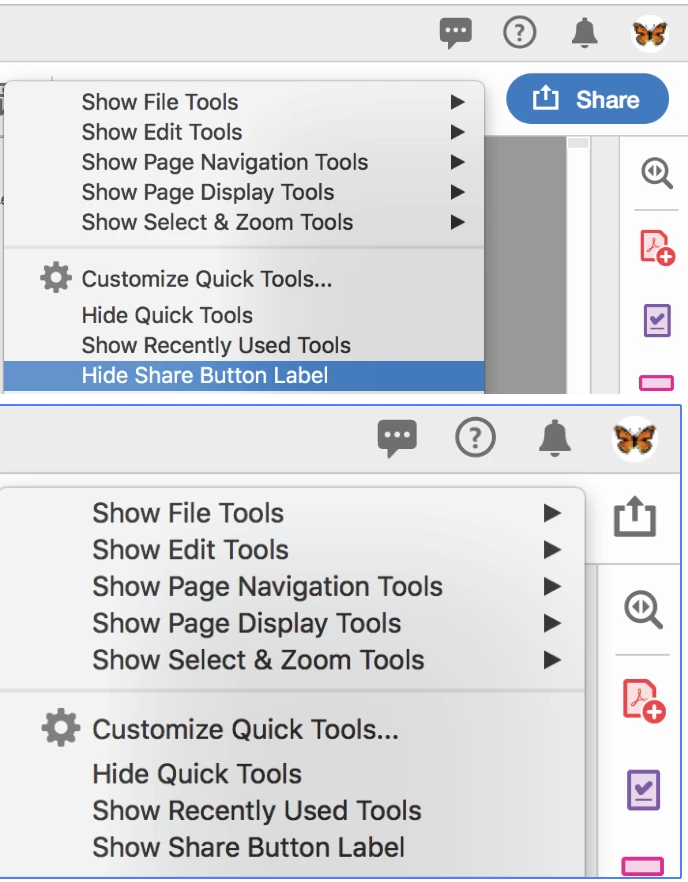
Right-click your toolbar and choose Hide Share Button Label.

7 replies

jane-e
Community Expert
jane-eCommunity ExpertCorrect answer
Community Expert
August 7, 2019

satrap  wrote

now there is a big blue Share button on the right of the toolbar. It's taking up the space I need for other toolbar buttons. Is there a way to get rid of Share? Thanks.

Right-click your toolbar and choose Hide Share Button Label.

Participating Frequently
August 13, 2019

This is false - and you know it.

It simply changes the big blue waste of space to a smaller, grey waste of space.

Don't be rude.

jane-e
Community Expert
Community Expert
August 13, 2019

https://forums.adobe.com/people/just+a+name  wrote

Don't be rude.

I am exiting this thread.

Adobe Employee
December 21, 2018

With our latest release on 11th Dec, 2018, the issue reported by you has been addressed.

If your product has not already been updated, to get the latest product update, click on the menu Help --> Check for updates in the product.

Now you can right click on the Toolbar and customize the Share button by selecting the appropriate option.

For more information about the release, please refer to the Release Notes and the New Feature Summary web links.

Hope this helps in addressing the reported issue. We look forward to the continued feedback.

RogerEllisJr
Participant
April 17, 2019

Where is this setting ? I've fully updated and I can't find it ?

Known Participant
April 17, 2019

See image below:

Rosco9000
Participant
October 23, 2018

Agreed.  I, and many others, choose an expensive professional solution because we have demanding workflows.

Adobe removing space for my needed tools to promote a feature I didn't ask for or want is disrespectful to their paying userbase.

Participant
October 11, 2018

Really?  I can't remove this huge distracting waste of space that is in the way of my workflow?  PLUS The animation pointing to it when I open Acrobat!  What's wrong with Adobe, they are suppose to be for creators, now they are pushing some useless feature on us without consideration.  Turning Acrobat into an ad platform for Adobe instead of a tool is not the way to go.

I hope this gets fixed very soon.

Participating Frequently
October 16, 2018

This "share" button has annoyed me to the point that I rolled the entire office back to v 18.011.20063.

I will not tolerate any additions that take up this much space and annoy so many people just to view PDFs.

This is a prime example of just how Adobe is completely so out of touch with their products and their customers - especially those of us installing this for the enterprise.

The last thing I would ever want to do from a PDF viewer is share something.

B

Kris Hunt
Legend
October 6, 2018

I agree. The gigantic blue button is obnoxious and distracting. I will never use it.

scottf67571169
Participant
October 4, 2018

I agree with ibigfire. It's pretty damn arrogant and disrespectful of Adobe to place anything over my customized toolbar without giving me a way to move it. Now I have to rewrite a bunch of macros and figure out what to move or remove to make things fit correctly. Pretty damn rude of Adobe.

Adobe Employee
October 2, 2018

Hello Satrap,

At the moment, it isn't possible to customize the Share button. Please file a feature request for the form via the link below

Feature Request/Bug Report Form to make the Share button customizable.

Please also see the link - What's new in Adobe Acrobat DC - on the capabilities introduced by the Share button.

-atul

Participant
October 4, 2018

Heckin' heck.  Thanks for the answer, but that's awful.  I have no use for the Share button.  I do have a use for the other buttons I specifically chose to go in that area, because I chose for them to go there.  Please don't remove customization like this.