Participating Frequently
March 9, 2021
Answered

How to replace comma with dot in form field

  • March 9, 2021
  • 2 replies
  • 5610 views

I'm trying to create a field in a PDF that might contain decimal numbers and calculates this field with another field. As an example, when I write 2.3 in the fillable field, the equation works, but when I write 2,3, the result is NaN. I want to replace the comma I wrote in the field with a dot, or if there is some other workable solution to make this calculation work, I exept all solutions. I have tried with JavaScript (value.replace (/, /, '.')) But I can not make it to work or I'm placing it to a wrong place or something. Please notice that I'm not good at coding.


Can anyone help with this?

This topic has been closed for replies.
Correct answer Nesa Nurani

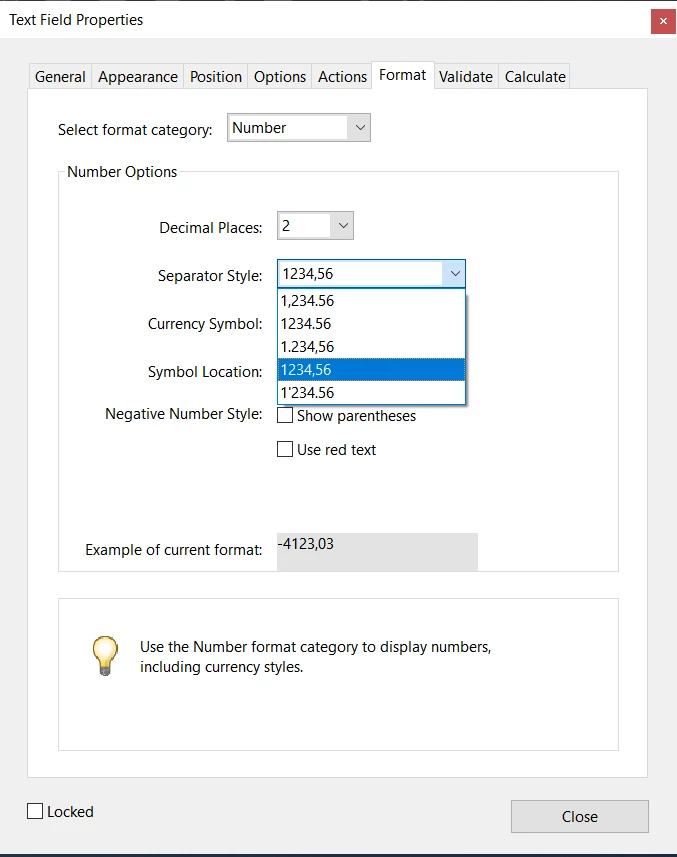
If you want to write , and field to show , but to calculate as decimal try select this option:

2 replies

Nesa Nurani
Community Expert
Community Expert
March 9, 2021

So you want to write 2,3 but field to show 2.3?

try this as custom format script:

event.value = event.value.replace(",",".");

Nesa Nurani
Community Expert
Nesa NuraniCommunity ExpertCorrect answer
Community Expert
March 9, 2021

If you want to write , and field to show , but to calculate as decimal try select this option:

Participant
July 26, 2023

Is there a way to edit all fields at once? Because if I choose more than one field the window "format" doesnt show up, only when I choose a single field.

try67
Community Expert
Community Expert
March 9, 2021

Why not simply use the built-in Format option that has a comma as the decimal separator? That will allow you to enter the value directly with the comma, and will handle it correctly in later calculations.

Pasi5C52Author
Participating Frequently
March 9, 2021

Tried that. If I write 2,3 it gives me back 23.00? 


try67
Community Expert
Community Expert
March 9, 2021

What option did you select under the Format tab?