


Participant
April 9, 2024
Answered

How to set default page view for specific document when others open it?

  • April 9, 2024
  • 2 replies
  • 1892 views

I have a PDF that I would like to default to 2-page view with a cover page when anyone opens it.  Is there a way to somehow "attach" these settings to the specific PDF document so it opens for everyone with these settings by default?
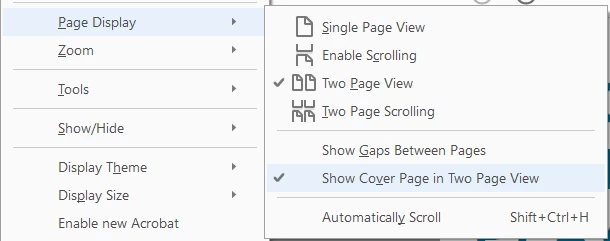
I'm having a hard time searching this as it keeps giving me instructions on how to change your own default view settings for all PDFs you open & that's not what I'm trying to do.  Could definitely use some help figuring this out.  Thank you!

Correct answer try67

Via File - Properties - Initial View.

2 replies

Participant
May 27, 2025

Wondering if you ever figured this out?

Meenakshi Negi
Community Manager
Community Manager
May 27, 2025

Hi MiaLazz,


Thank you for reaching out.


If you are looking for the option to change the page view for a specific document, please use the following steps:


1. Go to Menu > Document properties.

2. Go to the Initial View tab in the Document Properties window.

3. For the Navigation tab, select the required option from the drop-down.

4. Click the OK button at the bottom to save the changes.


5. Reopen the PDF. 


Let us know how it goes.


Thanks,

Meenakshi

try67
Community Expert
try67Community ExpertCorrect answer
Community Expert
April 10, 2024

Via File - Properties - Initial View.