



Question
How to set the default for 'View with Scrolling' to disabled in the Chrome Acrobat extension
Hi, I would really like to disable ‘View with scrolling’ on the Chrome Acrobat Extension, as I work with an ultrawide monitor and scaling to page width by default is not usable.
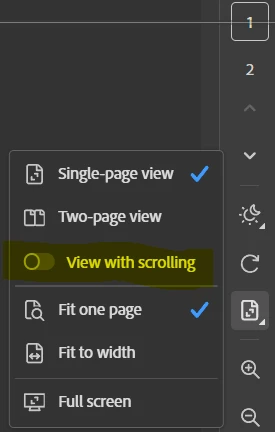
I’ve tried every fix I could search up, including changing settings in the Acrobat desktop app, but nothing I have found works.
There is no option that I can find in Preferences in the extension.
If there is a way to do this please let me know, as the time wasted changing this setting each time I open a PDF adds up through the day.
Cheers 👍🏾
-----
Win 11, Chrome Version 149.0.7827.55, Acrobat Extension Application version - 1.3.160 (at time of writing, but both set to auto-update)
 AdChoices