
Answered
how to set the same checkbox
I have to create the same checkbox. I can not set up in my properties so that it would look like this

how to set properties to look like this?
I have to create the same checkbox. I can not set up in my properties so that it would look like this
how to set properties to look like this?
Hi Annak,
Sorry for the delay in response.
To set the same checkbox, open the PDF form in Acrobat DC.
Select the "Prepare Form" tool and then right click on the checkbox.
From the drop-down list, select "Create multiple copies".
Then select the number of fields required across and down in the "Create Multiple Copies of Fields" window. Check the screenshot below.
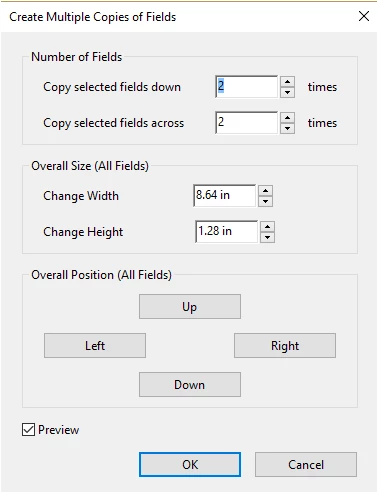
Select the position and size of all the fields as required and check the box for Preview. Once you are done, click on OK at the bottom of that window.
Hope the information helps.
Let us know if you are referring to something else or need any help.
Regards,
Meenakshi
Already have an account? Login
Enter your E-mail address. We'll send you an e-mail with instructions to reset your password.
 AdChoices