


June 26, 2021
Answered

How to shrink the size of the cover page (the 1st page) of a pdf file?

  • June 26, 2021
  • 6 replies
  • 4109 views

The pdf file is here: https://zzzhhh.egnyte.com/dl/E2fDor5OZq

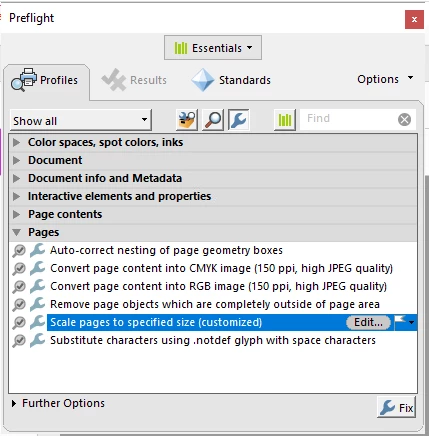
As you can see, the cover page (the 1st page) is far larger than all other pages. So I want to shrink it to the same size as others, specifically, to 8.263 in x 11.695 in. I read the article here which uses Preflight to scale a page. But maybe because I am working on Windows 10, the "Scale pages to specified size" fixup does not exist (please disregard the one I created in the screeshot below):
So, I decided to create one according to this article. However, I don't know what I should set in the "Adjustment" option. What is worse, since I only need to shrink the first page, I don't want to apply the fixup to all pages. But I did not find "First page" or "Specified page(s)" that I expect in the dropdown menu of "Apply to".
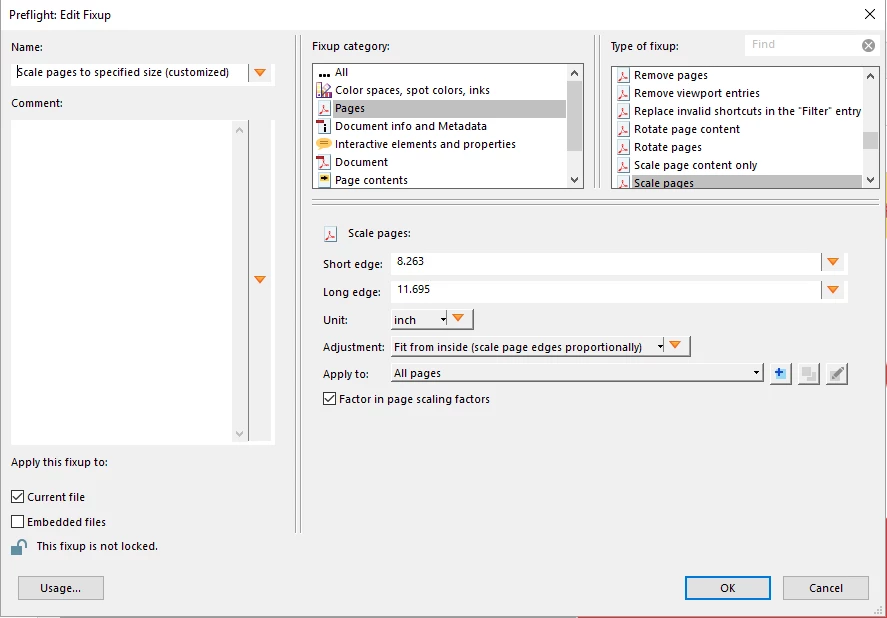
So, can you please tell me what the "Adjustment" option I should choose for shrinking, and how to specify "Apply to" to apply the fixup to the cover page only? In addition, it's so awkward to use Preflight to perform such a simple task. Is there any other function in Acrabat DC Pro I can use to do it in an easy way? The answer from Sophia Baloch in this thread seems to work (Crop Pages) , but I got a ridiculous error "Page size may not be reduced". Please help me with this simple task of shrinking the cover page. Thank you.



Correct answer Document Geek

Extract the cover page as a single page PDF. Then apply the fix up to that new document. Then in the pages panel, replace the cover page of your book with the smaller one you've just made. 

6 replies

IslandFox
Participating Frequently
March 13, 2025

Menu > Print > Adobe PDF. Printing as PDF made everything the same size for me.

JR Boulay
Community Expert
Community Expert
March 14, 2025
Acrobate du PDF, InDesigner et Photoshopographe
JR Boulay
Community Expert
Community Expert
October 20, 2022

I guess you're using Acrobat Pro, not Acrobat Pro DC.

.zip and .kfp files cannot be attached here, send me a private message if you want it.

Acrobate du PDF, InDesigner et Photoshopographe
Participant
October 20, 2022

Thanks so much for responding.  Yes, I'm using Adobe Acrobat Pro 2022.  I guess it ships with a different set of fixups?  Is there a link to somewhere Adobe allows you to download additional fixups?


I can make my own fixup to rescale page size, it actually doesn't seem that hard, but the bit I'm unclear on with the scaling is what difference it makes if you choose fit from inside or fit from outside.  I am usually rescaling from A4 to Letter or vice versa and those two formats each have one side longer and one shorter than the other format (so it's not a simple case of scaling a page up or down).

JR Boulay
Community Expert
Community Expert
June 27, 2021

All the pages of your document are in A4 format, except the cover, so you can use this fixup.

Acrobate du PDF, InDesigner et Photoshopographe
Participant
October 19, 2022

I don't have that fixup in Preflight - it seems like I'm missing a lot of fixups that should be present.  Is there somewhere I can download the missing fixups from?  I've already tried repairing acrobat from Control Panel and importing Default.kfp from the hard drive.

JR Boulay
Community Expert
Community Expert
June 26, 2021

In addition to Document Geek post:


Acrobate du PDF, InDesigner et Photoshopographe
June 26, 2021

What's the sense of your addition?

Document Geek
Community Expert
Document GeekCommunity ExpertCorrect answer
Community Expert
June 26, 2021

Extract the cover page as a single page PDF. Then apply the fix up to that new document. Then in the pages panel, replace the cover page of your book with the smaller one you've just made. 

Bernd Alheit
Community Expert
Community Expert
June 26, 2021

You can apply the fixup to all pages.

June 26, 2021

Yes, I can. But I don't want to do that.

Bernd Alheit
Community Expert
Community Expert
June 26, 2021

Change the "Apply to" entry.