



How to solve a problem in typing a dot at the end of a sentence in Acrobat?
Hello everyone,
When I create a blank page pdf file, then when I add a text box, then when I type in the box a sentence, then when I type at the end a dot, the dot moves to the start of sentence. I type in English language.
I have done the following, but the problem still exists:
Adobe Acrobat Pro settings:
- In Adobe Acrobat Pro > Preferences > Language I have tried the following:
- In Application Language, I tried English option. Also, I tried Same as the operating system option.
In Default Reading Direction, I tried Left to Right option, Right to Left option, and Infer direction from document option.
- I enabled and unenabled "Enable right-to-left language options"
- In Select Font, there are three options, and I tried all of them.
- In Main Paragraph direction, I tried Left to Right option and Right to Left option.
- In Adobe Acrobat Pro > Preferences > Content Editing I have tried the following:
- In Reading Order, I chose Left to Right, Top to Bottom option
- On Computer I have done the following
- Windows display language is English (United States)
- first language in the list of preferred language is English (United States)
- Country or region is United States
- Regional format is English (United States)
- I restarted my computer.
I use Windows 10, and I use Adobe Acrobat Pro version 25.001.20577
I see this problem in more than one file so I think this problem is exist for all files I have. I installed and uninstalled Acrobat several times.
Also, I clicked on printer icon, then in Printer, I chose Adobe PDF, then in Advanced, I enabled Print to File option, also, I enabled Print As Image option, then I clicked on OK, then I clicked on Print.
I contacted Adobe support and they give me a file or toll and by that toll I uninstall the Acrobat then we downloaded it again from the following page:
https://helpx.adobe.com/acrobat/kb/acrobat-dc-downloads.html
In the following, here a screenshot for the problem:
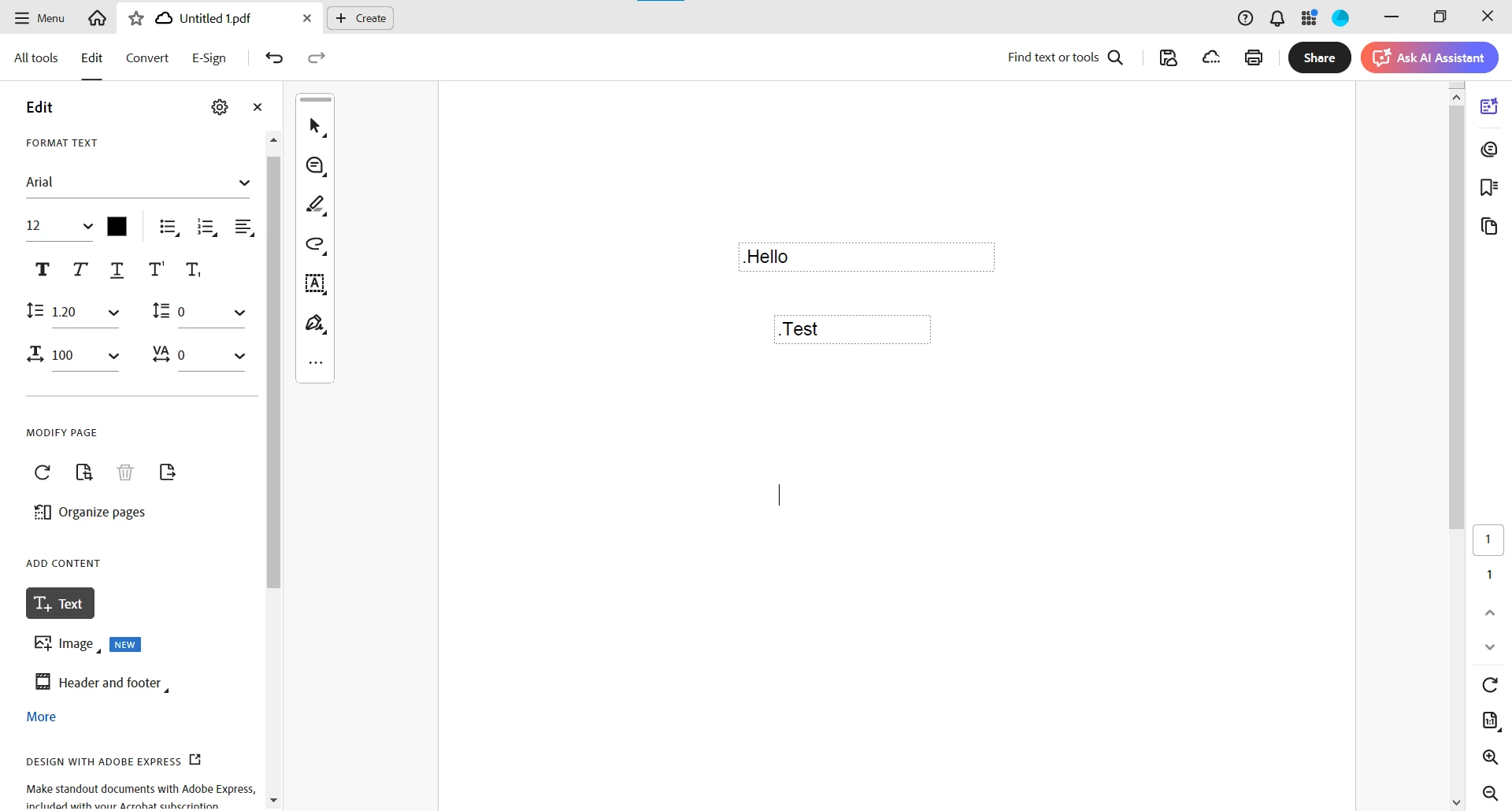
This problem does not exist in Adobe Acrobat online, but it exists in Adobe Acrobat desktop, so how to solve this problem?
 AdChoices