
Participant
August 2, 2022
Answered
How to sort the options on a custom dialog popup menu?
- August 2, 2022
- 1 reply
- 1248 views
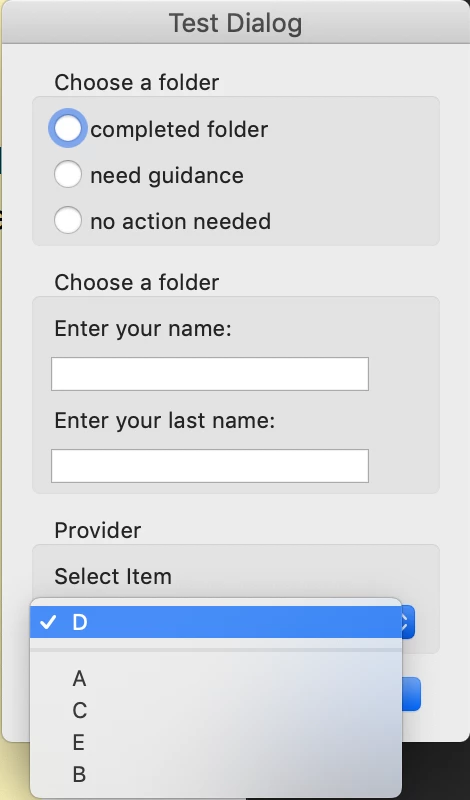
I'm developing a custom dialog that will be used to fill out form text fields when inserting stamps.
The code below is in my initialize function:
dialog.load({
   "sub1":
   {
      // Note: positive value represents the default item
      "A": -1,
      "B": -2,
      "C": -3,
      "D": +4, // default item
      "E": -5
   }
});
The code below is in my description dictionary, as one of the elements
{
   type: "view",
   align_children: "align_left",
   elements:
      [
         {
            type: "cluster",
            name: "Provider",
            elements:
               [
                  {
                     type: "static_text",
                     name: "Select Item",
                     font: "default"
                  },
                  {
                     type: "popup",
                     item_id: "sub1",
                     variable_Name: "sub1",
                     width: 150,
                     height: 20
                  },
               ]
         }
      ]
},
My question is, how can I prevent acrobat from sorting elements shown in the dropdown menu alphabetically? The way it is, those elements are sorted in alphabetical order but I'd like to have them in the specific order I typed them in the code.
obs.: I tried changing the values of the "sub1" dictionary but they don't change the order of the options. The + number does change what is the default option though.
i.e. this didn't change the order of the list:
"sub1":
{
   // Note: positive value represents the default item
   "A": -5,
   "B": -4,
   "C": -3,
   "D": +2,// default item
   "E": -1
}
 AdChoices