
August 23, 2016
Answered

How To Switch From Window To Tabbed In Acrobat Pro DC?

  • August 23, 2016
  • 7 replies
  • 10056 views

Hi all,


I was hoping somebody could tell me - how do you switch from a window view to a tabbed view in Acrobat Pro DC?

Currently, Acrobat opens all new PDFs in an entirely separate window; I would like Acrobat to only be one window, but with several tabs - one for each PDF.


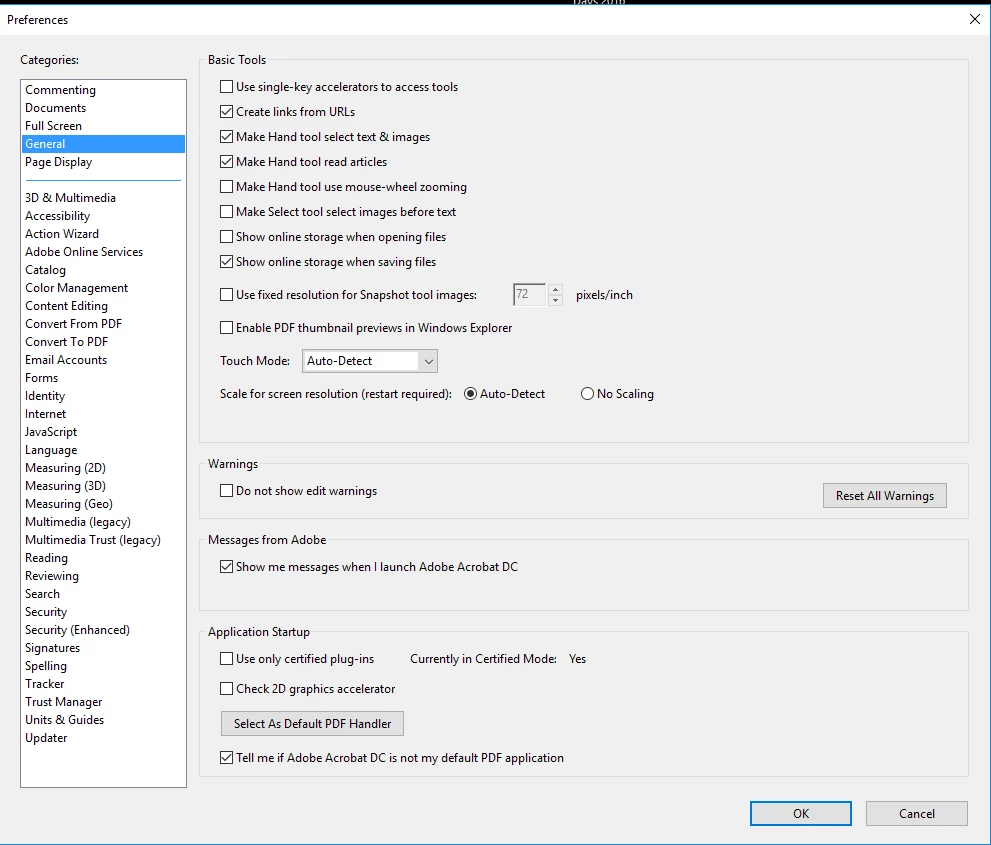
I've searched pretty extensively, and have found solutions that seem as if they'd work for other versions - but when following the same instructions, I end up in a menu with different selection options. I'll provide a screen-shot and link to the instructions I've found (they're all pretty similar).


I've checked each of the categories, and can't seem to find the option anywhere. I've also looked through the Adobe Acrobat DC Help PDF, and can't seem to find the answer.

Does anybody have any idea how I can change from a window to tabbed view?


Thanks in advance for your help!


Instructions:     Keeping Tabs on Your Documents | Adobe Document Cloud


Screen-shot of menu - missing the pertinent selection box:
Correct answer Test Screen Name

Perhaps you don't have the subscription - subscription only feature. Permanent license holders will be able to upgrade one day, we imagine.

7 replies

JR Boulay
Community Expert
Community Expert
June 25, 2025

[MOVED TO THE ACROBAT DISCUSSIONS]

Acrobate du PDF, InDesigner et Photoshopographe
Participant
June 24, 2025

I have found one round about way of getting multiple tabs to show up in one window when they open in separate windows. The files I'm opening are stored in temp files which makes my case a little unique. 


Right click on the tab you want open in the other window.

Click "reveal in explorer"

Drag that file into the window where your other files are.


If your files aren't temporary, you can probably also just "open recent" files on the home tab of the window you want to use after opening them separately. 


Participating Frequently
October 10, 2016

Hello.

Beside the setting in the preferences, is there a command to do it manually (per case basis) ?

Since there are commands to display tabs in a cascade or in portions of the screen, isn't there somewhere a way to gather independent windows back into tabs ?

Thank you.

Participating Frequently
October 10, 2016

I found, we can drag and drop one tab beside to another one, this merges two windows. I knew that but if the preference to "Open new windows in tabs" is not set On, we can't even see one single tab. It sounds logical, but maybe the text string could have been something like "Use tabs to organize windows"

Legend
August 26, 2016

Absolutely on purpose. The classic version does what has always been done in the past...saves up new features and sells an upgrade. Perhaps the organisation will upgrade.

The organisation might have had the choice of Continuous and not used it because they don't want the Siftware to constantly change.

August 26, 2016

Welllllllll crap. I guess I'll have to talk my IT department.

Thanks for your help!

Legend
August 25, 2016

Yes, that is indeed the Classic version. No tabs update available.

August 25, 2016

.

I assume they did this on purpose, and are not planning on putting this feature in the classic version?

Legend
August 24, 2016

Hmm. It's a little more complicated for volume licenses. Some kinds of volume lucense allow one to pick either the permanent ("classic") or subscription ("continuous") version.  Also they may just have not allowed updates. Let us know the version from Help > About, eg 2015.123.40133.

August 25, 2016

Seems like the version is 2015.006.30201 (snip below).

Test Screen NameCorrect answer
Legend
August 23, 2016

Perhaps you don't have the subscription - subscription only feature. Permanent license holders will be able to upgrade one day, we imagine.

August 24, 2016

Ah - darn! Thank you for your answer.

The computer I'm working on is a campus computer.

I'm not quite sure of the status of our licenses, so I'm wondering: do universities typically not have the full subscription?