


Participant
April 24, 2025
Question

How to Turn Off Grey Popups When Hovering Over Images

  • April 24, 2025
  • 2 replies
  • 5757 views

Hello,


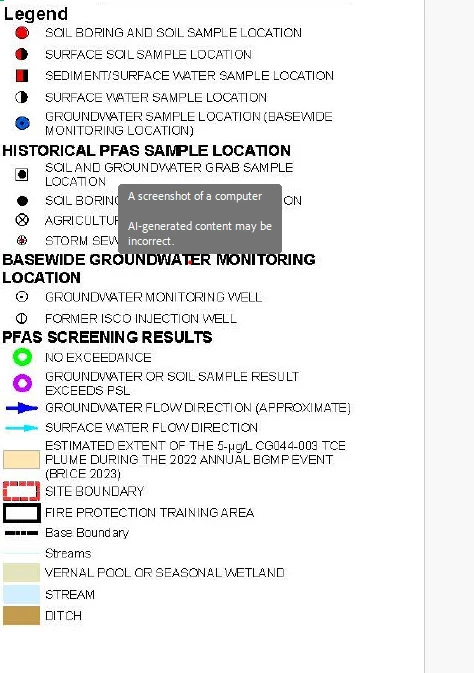
I'm currently using Adobe Acrobat to give a presentation, and I need to use my cursor to point out information that I present from figures. When I hover over certain images, I get this weird popup that gives a description of the image, with the text "AI-generated content may be incorrect" (see the attached screenshot). Due to the nature of the presentation, I cannot show the entire slide, but it does this with each image that is put into this presentation. All the information I've seen online says this comes from the generative AI assistant, and to turn it off in the Preferences menu, but I don't see a Generative Ai tab in the preferences to change this. 


The presentation was created in PowerPoint and then a PDF was generated. The jpeg images that are causing the issue were take from large PDF files, printed to a single page PDF to extract the image I wanted to present, then saved as a jpeg and cropped in the Photo's App. Everything points to the grey popups being generated from Ai, but I can't figure out how to turn it off. Can someone please help?

 

2 replies

Participant
July 22, 2025

Print > as a PDF.
Re-PDF your PDF. 

Community Manager
April 24, 2025

Hi @William356083989f07


Sorry for the troubled experience, and thank you for reaching out. 

Based on the Grey pop-up, I am suggesting the following to test:

- Launch Acrobat, Hold Ctrl/Cmd + K > Preferences > Generative AI > Try disabling it, restart the app, and check this issue again. 


Let us know how it works, if it works, enable the feature, and try tweaking options starting with "Show AI..." 


~Tariq

Participant
April 30, 2025

Hey Tariq,


Thanks for getting back to me! Unfortunately, when I go to preferences there is no options for generative AI (see below). 


AnandSri
Community Manager
Community Manager
May 29, 2025

Hello @William356083989f07!


I hope you are doing well.


Please ensure the latest version of Acrobat is installed on the machine: 25.001.20474 (Win) | 25.001.20476 (Mac), Apr 28, 2025. Check for any pending updates from the Menu > Help> Check for Updates, install the updates, restart the app and the machine, and try again.


Let us know if you still don't get the preference settings.

Thanks,

Anand Sri.