
Participating Frequently
October 14, 2021
Answered

How to write JavaScript that launches immediately when user opens PDF file

  • October 14, 2021
  • 2 replies
  • 2560 views

We want to introduce new features with JS to our customers in our bills, offers, etc made in .pdf to leave feedback and use other interactive features.

I m new with both JS and Acrobat Pro too.

For testing purpose for myself and for now I want to acieve to get an alert (message box) immediately after opening my .pdf file.

Any advice how to do it in JavaScript Editor is welcome.
This topic has been closed for replies.
Correct answer JR Boulay

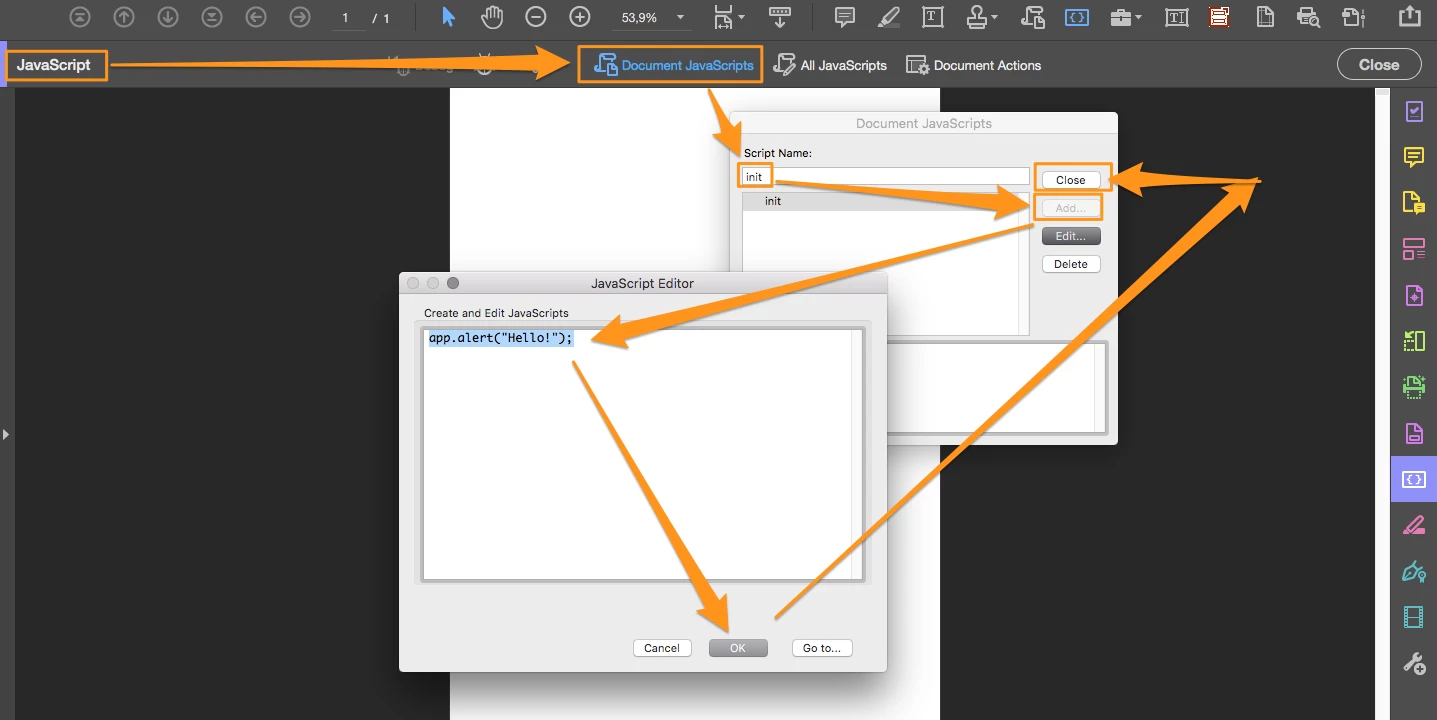
Try this:

app.alert("Hello!");


"init" is a sample, you can use every name you like (using the web syntax).

2 replies

JR Boulay
Community Expert
JR BoulayCommunity ExpertCorrect answer
Community Expert
October 14, 2021

Try this:

app.alert("Hello!");


"init" is a sample, you can use every name you like (using the web syntax).

Acrobate du PDF, InDesigner et Photoshopographe
Armin5E0CAuthor
Participating Frequently
October 14, 2021

Thanks bro!

that does the job.

function test()
{
    app.alert("Hello");
}
test();

After the function definition you ve to call it, so it works, but I got the answer.

Thanks again

Bernd Alheit
Community Expert
Community Expert
October 14, 2021

You can use the document open event for this.

Armin5E0CAuthor
Participating Frequently
October 14, 2021

Thanks for quick answer.

I tried:


function test()
{
    document.addEventListener ('open',() => {
    alert('Hello');
});
}

in Javascript Editor but didnt work. Doesnt work with load event too.

Bernd Alheit
Community Expert
Community Expert
October 14, 2021

You can't use web browser javascript in Acrobat.