
griegos321
Participant
August 20, 2019
Question

Hyperlinks from MS Word not working when saved as PDF

  • August 20, 2019
  • 1 reply
  • 1931 views

When I create a current (MS Word Version 16.28) document and hyperlink the text, the hyperlinks do not work when I save the document as a PDF. I have made sure the "Create links from URLS" option is checked like a different thread advised, and it still is not working. Email links (mailto:emailaddress@example.com) continue to work, but not hyperlinks to web pages.

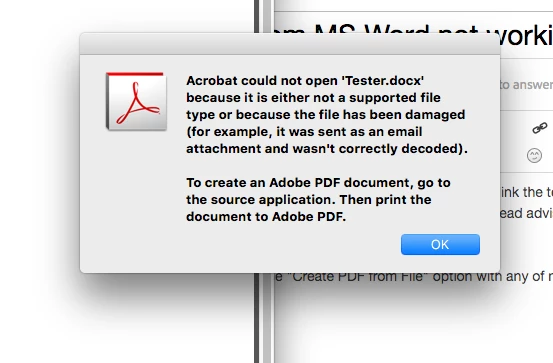
I also am unable to use the "Create PDF from File" option with any of my MS Word documents. It keeps giving me this error message (see image below). So my only option has been the "Save As PDF" option in MS Word, but then my hyperlinks don't work. Please fix this!!!!!
This topic has been closed for replies.

1 reply

Participant
February 1, 2020

I am extremely annoyed. I bought Adobe in good faith to convert a Word document to PDF and preserve hyperlinks. I may as well have just stuck with Word because there seems to be no way to preserve hyperlinks in Adobe. I have seen many similarly frustrated people. This is the only reason i bothered with Adobe. PLEASE advise

Nancy OShea
Community Expert
Community Expert
February 1, 2020

"I bought Adobe in good faith... "

Adobe is a company name like Apple or Microsoft. 

  • Do you have the latest Acrobat Pro DC?
  • Which version of MS Word do you have?
  • Have you tried printing to PDF?


Nancy O'Shea— Product User & Community Expert