
Participant
January 31, 2025
Answered

I am new to Adobe Pro. I have several questions about how to make our order form dynamic.

  • January 31, 2025
  • 2 replies
  • 284 views

I have some quetions about how to make our complex order forrm be able to:


1. Calculate totals according to radio button selections:

- Base Cost + Upcharges by selection choices (radio buttons and Personalization Text Fields): Extened sizes and premium garments etc. Each item will be unique. See attached order form.

-  Also, I need to know how to protect the document so when it is sent out and completed, the customer can send it in and the selections they have made are protected and cant "Accidently" be changed if we happen to click on the form.

- Java Script ? How easy is it to learn how to write? is there a good tutorial I should access for any scripts that need to be made?


Usually our forms have around 16 items, that are customizeable. I am attaching a "Sample" of one I am working with for learning and testing purposes.
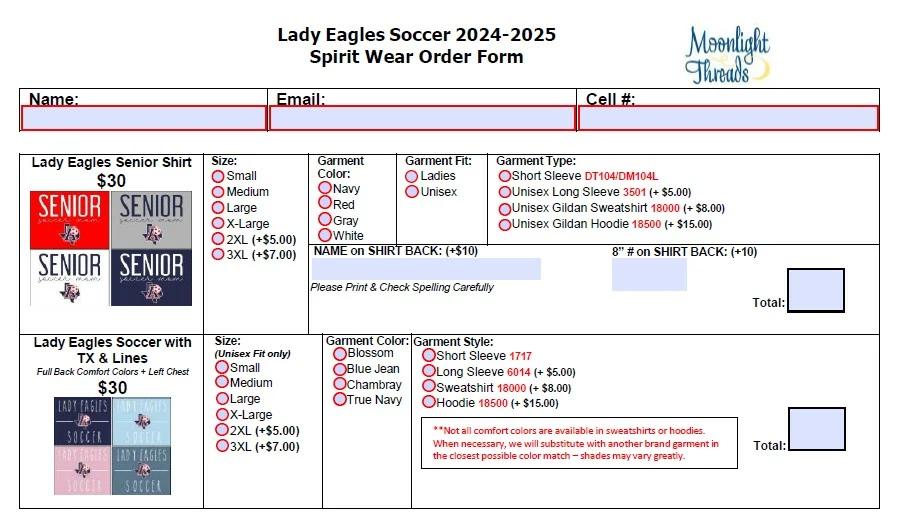


Thank so much for any help you can offer.

Correct answer PDF Automation Station

There are more than 65 free articles on JavaScript for Acrobat here:

https://pdfautomationstation.substack.com/

I developed a JavaScript course for Acrobat (paid for) here:

https://www.pdfautomationstation.com/public/Learn-To-Use-Adobe-Acrobat-Pro-DC-Like-A-Professional.cfm

If you send me a private message I will provide you with a $100 discount promo code.

2 replies

PDF Automation Station
Community Expert
Community Expert
February 1, 2025

There are more than 65 free articles on JavaScript for Acrobat here:

https://pdfautomationstation.substack.com/

I developed a JavaScript course for Acrobat (paid for) here:

https://www.pdfautomationstation.com/public/Learn-To-Use-Adobe-Acrobat-Pro-DC-Like-A-Professional.cfm

If you send me a private message I will provide you with a $100 discount promo code.

Thom Parker
Community Expert
Community Expert
January 31, 2025

This article will provide you with some intro to forms information:

https://www.pdfscripting.com/public/PDF-Form-Scripting.cfm


Thom Parker - Software Developer at PDFScriptingUse the Acrobat JavaScript Reference early and often