
Participant
February 21, 2026
Question

I am unable to open any PDfs. I have followed all troubleshooting steps I can find.

  • February 21, 2026
  • 2 replies
  • 56 views

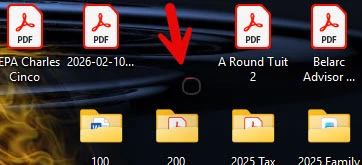
I am unable to open any PDFs on my computer. I have uninstalled, reinstalled and it worked for a few minutes, then the open files disappeared. Now when I try to open a PDF, I get a small circle on my desktop. See the attached jpgs. I cannot move it or expand it. When I click on the circle  the icon on the task bar disappears, maybe it shuts down.? I have installed, reinstalled, repaired multiple times. Any assistance will be appreciated.
 

    2 replies

    Randy Hagan
    Community Expert
    Community Expert
    February 22, 2026

    You may want to try to open it in your web browser. Right-click on the PDF and choose the Open with… flyaway menu command. Pick the web browser(s) of your choice ad see if the file(s) open(s).


    If it opens easily on there, it’s likely an Acrobat issue. If it doesn’t, It’s likely an issue with the PDF file. That will help narrow down the possibilities, and help us help you get past your issues.


    Hope this helps,


    Randy

    Participant
    February 22, 2026

    Yes they will open in a browser. Thank you.

    Randy Hagan
    Community Expert
    Community Expert
    February 22, 2026

    OK. Next step in the support tree is to reset preferences for your Adobe App(s). 


    You can learn more about that through the following link:


    This cures many unpredictable little ills. Hopefully it will do so for you too.


    Randy

    creative explorer
    Community Expert
    Community Expert
    February 22, 2026

    @danielkilburn that circle was similar to this post

    m