figureitoutaaa
Participant
February 19, 2026
Question

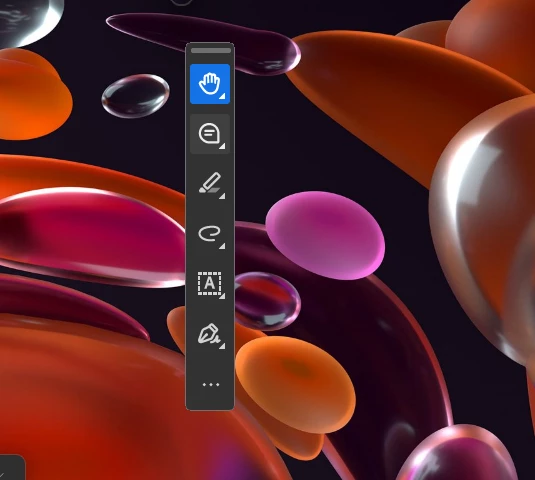
I can only see the toolbar. Nothing else unless I do ctrl + l.

  • February 19, 2026
  • 26 replies
  • 25637 views

I hit something and now only the floating toolbar is there. I can’t see any of the documents when I open them.  
 

    26 replies

    Manuel29054617pxri
    Participant
    March 6, 2026

    OMG I am so glad, to have found this. I was going out of my mind, I hope they fix it soon 

    Manuel29054617pxri
    Participant
    March 6, 2026

    Yes disable new acrobat, fixed it

    Ellen326690698w6d
    Participant
    March 5, 2026

    glad I’m not the only one

    Adam M 2026
    Participant
    March 5, 2026

    somehow - it has messed up your ‘minimised’ preference. i fixed by clicking and draging the window to a preferred size. closed it then reopened and so far nor mal service has resumed

    creative explorer
    Community Expert
    Community Expert
    March 4, 2026

    This is why I ‘disable new Acrobat’ right off the bat. I don’t have any issues with the classic view! 

    m
    mmeyers509
    Participant
    March 4, 2026

    After days of struggling with this, I clicked on the Adobe icon in the tray at the bottom and saw a small option to maximize and it restored it to full screen and not just the toolbar sliver!  WHEW…  Very frustrating. 

    dnsimpson11
    Participant
    March 4, 2026

    Thank you! I have been trying to figure this out for weeks! usually when I hit the little dot it closed it. I do see in the menu an option to Disable new acrobat.

    dwcraft
    Participant
    March 3, 2026

    What happened to this program ??  Same issue as the picture above.  No chat with adobe ??? 

    ronnie_7859
    Participant
    March 3, 2026

    Thanks for starting this thread. It’s very time consuming doing some of the work arounds listed. Please fix this.

    MaxMudman
    Participant
    March 2, 2026

    This worked for me, solution suggestion from Copilot.  I manually added the DWORD in Regedit.

    Registry Editor

    1. Open regedit
    2. Navigate to:
      HKEY_CURRENT_USER\Software\Adobe\Adobe Acrobat\DC\AVGeneral
    3. Create or edit DWORD (32-bit) value: bEnableAV2
    4. Set it to 0
    5. Restart Acrobat

    PowerShell

    Set-ItemProperty -Path "HKCU:\Software\Adobe\Adobe Acrobat\DC\AVGeneral" -Name "bEnableAV2" -Type DWord -Value 0

    • This key applies to Acrobat DC (Pro/Standard).
    • Reader uses the same key under the Reader path.
    • If the key doesn’t exist, Acrobat defaults to the new UI, so you must create it.
    Merril_
    Participant
    March 5, 2026

    YESSSSSSSSSSSSSSSSSSSSSSSSSSSSSSSSSSSSSSSSSSSSSSSSSSSSSSSSSSS
    Omg I have been losing my mind trying to get my character sheets for my DnD sesh, and suddenly acrobat became a little Circle. And when I opened a PDF it was just a toolbar.

    megford8
    Participant
    February 27, 2026

    Has anyone tried uninstalling the latest update? I cannot work like this. I need to have multiple documents open at once and I barely get one opened and it is so slow. Between the ridiculous AI tools dragging it down, now I can’t even open a PDF without it taking up my entire screen?! This is NOT user friendly. The work arounds do work, but why am I using a work around to be able to open a document. You have one job Adobe, let us open documents...that’s it!
