rodeze
Participant
May 9, 2018
Answered

I can't clear my signature

  • May 9, 2018
  • 5 replies
  • 57078 views

I have been using the digital signature for years, but now I can't clear my signature to resign it.

Correct answer AnandSri

Hello Rodeze,

As per the description above, I can understand that you want to clear/remove your digital id from a PDF, Is that correct?

The "Clear Signature" option is available in Acrobat Pro DC. You can clear a signature if you are the signer, that is if the digital ID with which you did the signing is available to Acrobat.

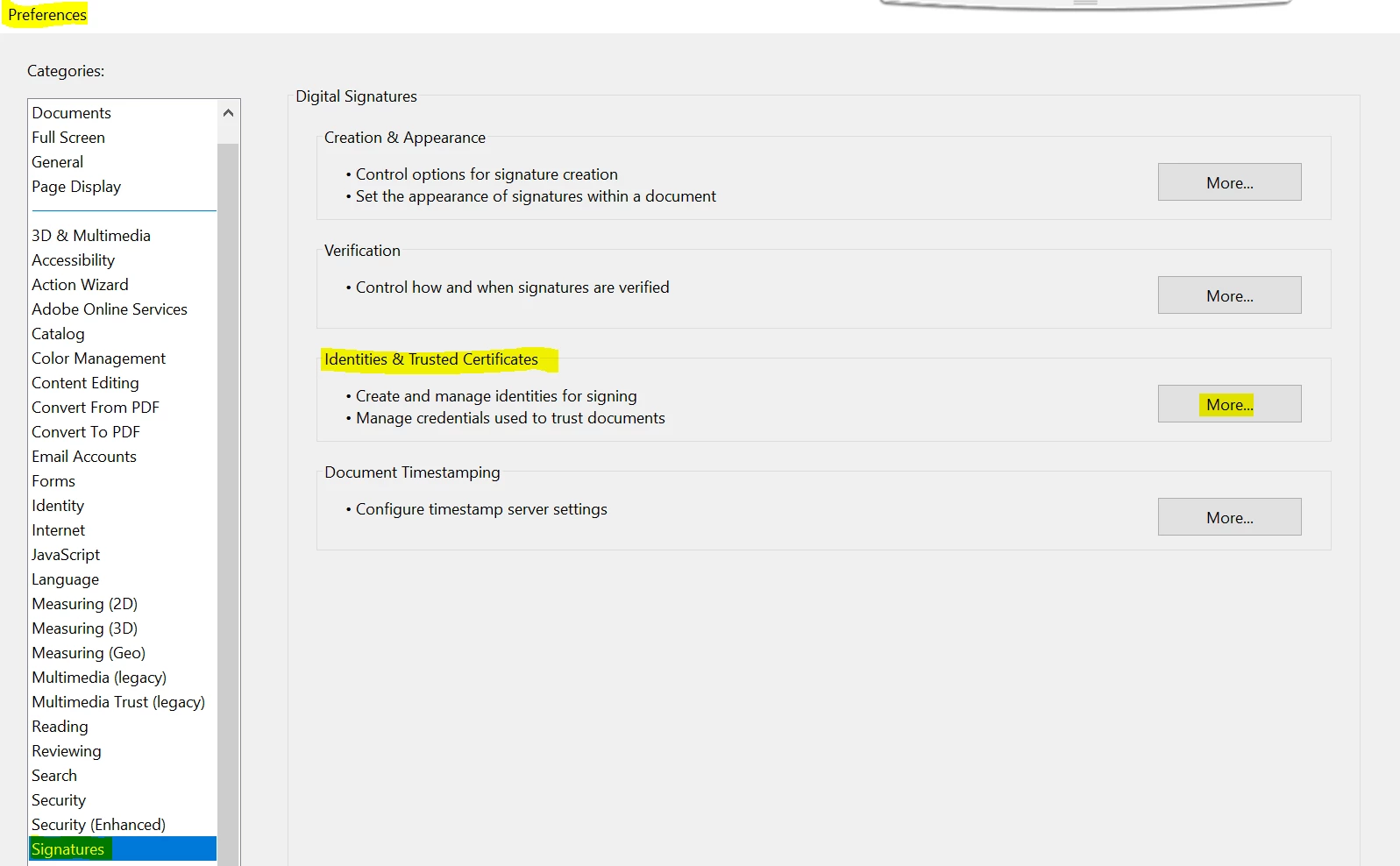
Navigate to Acrobat's Preferences from Edit>Preferences>Signatures>Click the "more..." button next to "Identities & Trusted Certificates". Click the "Digital IDs" category.

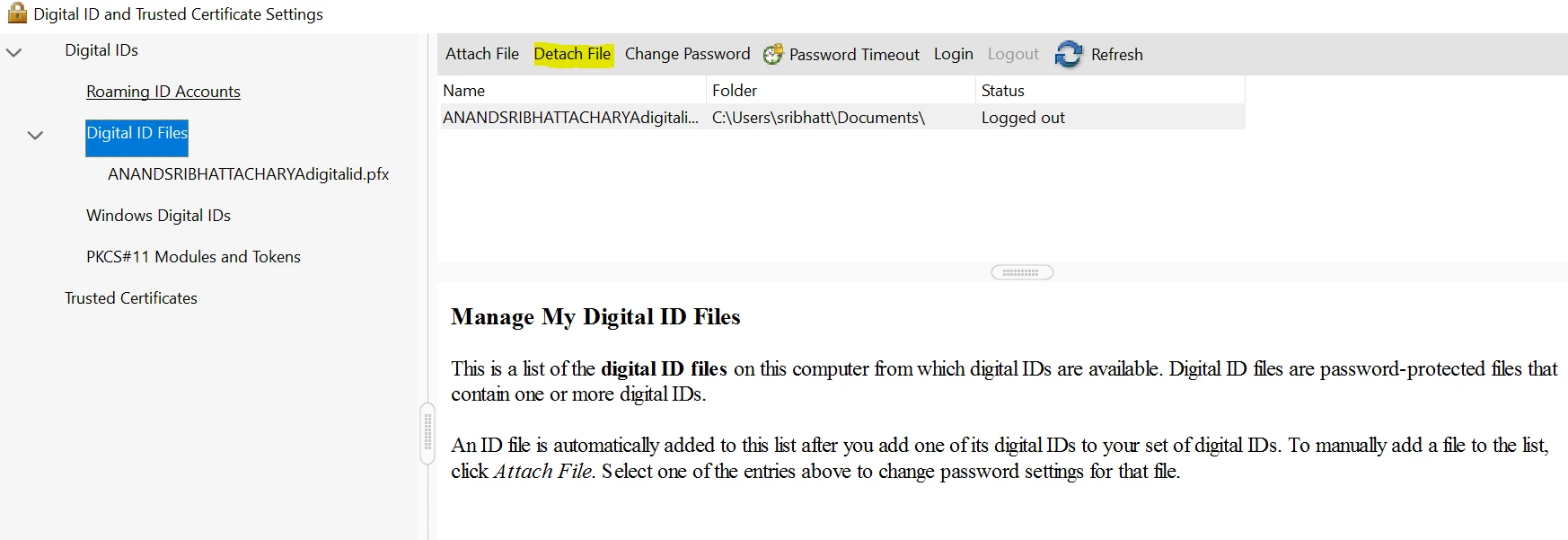
If the digital ID used for signing is stored in a file, then you will get the option of "Detach File", highlight the Digital Id, and click on Detach File.
To know more about Digital IDs, you can refer to Adobe article Digital IDs in Acrobat

Let us know how it goes and share your findings.

Regards,

Anand Sri.

5 replies

Participant
April 19, 2024

The minus signs to remove the signature and initials are not responding.  Please fix it or let me know if there is an alternate way to redo my signature.

Participating Frequently
April 19, 2024

what do we need to do to get an Adobe employee to wade back into this thread?  lots of us having the same issue.  

Meenakshi Negi
Community Manager
Community Manager
April 19, 2024

Hi Kurt36849330z4zk and ScottYu,


Thank you for reaching out and reporting this.


We are looking into this issue. Please confirm if this happens with all the PDFs to which you try to add signatures. 

It would be helpful if you could share the screen recording of the workflow so we can share it with the team. Also, please share the Acrobat and OS version numbers. We will get this checked.


Thanks,

Meenakshi

Participant
January 3, 2022

So I figured out what is going on.  This occurs when you created a digital signature and either deleted the profile from Acrobat or opened the PDF on a different computer.  It apparently only lets you delete signatures where you created the signature profile and it's present on the computer you are working on.  I opened the same document in another PDF form creation application by a different software manufacturer and was easily able to remove the signature.  I am not sure if you could recreate a signature profile with the same name and then do it in Acrobat DC Pro writer?

Participant
September 27, 2021

Have the same problem, i cant clear my signature 

Participant
October 6, 2021

also have this problem. started 3 weeks back. damn annoying

Participant
October 18, 2021

Hey all, 


I also had the same problem and was able to delete the signature by not just clicking on it, you have to click and hold that click - it finally went away. Hope it helps for all of you too.

Participant
September 17, 2020

Hello 


I followed your direction  however I am stillnot able to remove the signature when I am going to sign a document.  It is under the tab sign yourself and the remove button is greyed out see Screen shot below 


Please help 

AkanchhaS8194121
Legend
October 15, 2020

Hi,


The second screenshot shown for Sign your self under Fill & Sign feature. That's (-) icon is not grayed out. This is how it actually looks. Its appearance is like this.

When you click on "-" it will actually work.


Thanks,

Akanchha


Participant
June 3, 2021

Clicking the "-" sign does not clear out the signature. Nothing happens. I would like to re-draw my signature, but I am unable to clear the old one. Help?

AnandSri
Community Manager
AnandSriCommunity ManagerCorrect answer
Community Manager
May 9, 2018

Hello Rodeze,

As per the description above, I can understand that you want to clear/remove your digital id from a PDF, Is that correct?

The "Clear Signature" option is available in Acrobat Pro DC. You can clear a signature if you are the signer, that is if the digital ID with which you did the signing is available to Acrobat.

Navigate to Acrobat's Preferences from Edit>Preferences>Signatures>Click the "more..." button next to "Identities & Trusted Certificates". Click the "Digital IDs" category.

If the digital ID used for signing is stored in a file, then you will get the option of "Detach File", highlight the Digital Id, and click on Detach File.

To know more about Digital IDs, you can refer to Adobe article Digital IDs in Acrobat

Let us know how it goes and share your findings.

Regards,

Anand Sri.


