
Jeff Li13203482
Known Participant
July 2, 2022
Answered

I can't convert whole website to PDF with "Creat PDF from web page" because website need login?

  • July 2, 2022
  • 1 reply
  • 468 views

I find the method " How do I download entire websites and convert them into one PDF? " at here https://www.quora.com/How-can-I-convert-a-website-into-a-PDF-online 


* From the Tools menu, click on “Create PDF”
* Select “Web Page”
* Enter your URL and select the “Capture Multiple Levels” checkbox Select “Get entire site”
* Click “Create”


  But when I copy the steps, I find the errors in pages like the picture below, it seems need to login first. But I can make sure I have login in Chrome broswer and can browse the web pages build with grav CMS system ( a flat bolg system).
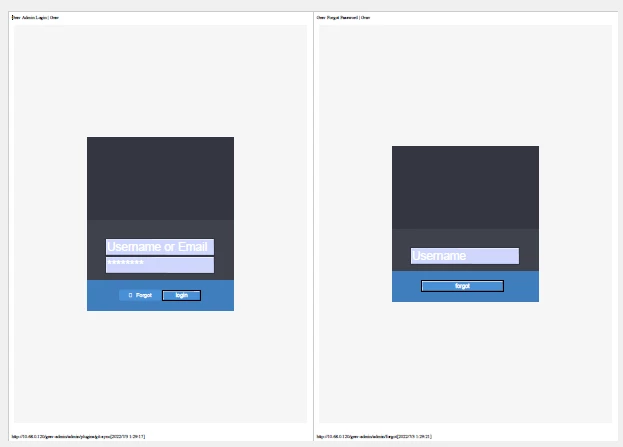
How can I resolve this problem?

This topic has been closed for replies.
Correct answer Test Screen Name

If the site needs a login, Acrobat can't convert it. There's no way to login or (I think) keep a cookie.

1 reply

Test Screen NameCorrect answer
Legend
July 2, 2022

If the site needs a login, Acrobat can't convert it. There's no way to login or (I think) keep a cookie.

Jeff Li13203482
Known Participant
July 3, 2022

Thank you, I give up convert "Grav CMS" whole website content to PDF because of poor typesetting.

Now my temporary solution is grab "Grav CMS" whole website content by using "Teleport Pro" software, then replace the login ref link to blank using "text replace expert" software, then pack the whole offline website folder to a iso file using "UltraISO" software.