


February 2, 2015
Question

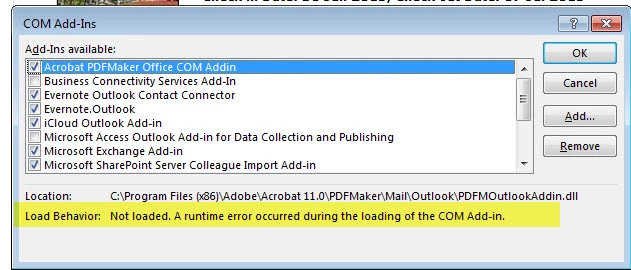
I can't get Acrobat PDFMaker Office COM Addin active in Microsoft Outlook (Office 365). It is listed as invacte but when I try to activate it I get "Not loaded. A runtime error occurred during the loading of the COM Add-in"

  • February 2, 2015
  • 1 reply
  • 16263 views

I just installed Acrobat Pro XI and can't get it to work with Microsoft Outlook (Office 365).  The add-in is listed as inactive and when I try to activate it I get this message:
This topic has been closed for replies.

1 reply

Anubha Goel
Community Manager
Community Manager
March 4, 2015

Hello brady-powertrips,

Could you please check the location of "PDFMOfficeAddin.dll" file on your system.

The location of this file has to be "C:\Program Files (x86)\Adobe\Acrobat 11.0\PDFMaker\Office"

Close outlook and the start it again.

Let me know.

Regards,

Anubha

Participant
March 24, 2015

I have the same problem as brady-powertrips - Office 365, windows 8.1 and Adobe acrobat XPro

location of PDFMakerAddin.dll is in

C:\Program Files (x86)\Adobe\Acrobat 10.0\PDFMaker\Office

same as you listed but Acrobat 10.0 library

Legend
March 24, 2015

Check you are not running 11.0.0, which is not compatible. Update.