Participating Frequently
November 22, 2022
Answered

I cannot export text from a PDF page as an image

  • November 22, 2022
  • 4 replies
  • 2225 views

I cannot export the text on the page as an image. When I choose to export a page with editable text it only exports the background and not the text; this leaves the whole page without text.

This topic has been closed for replies.
Correct answer Bernd Alheit

Thank you. But could you please show me how to do it?


In Adobe Acrobat DC I use:
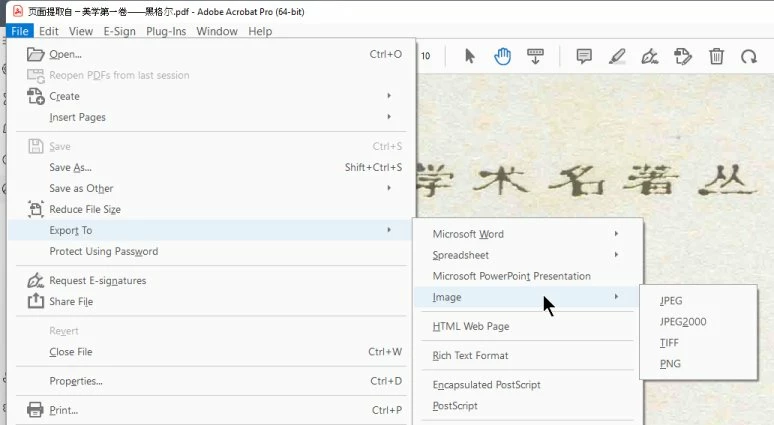
4 replies

Inspiring
November 23, 2022

Convert PDF to JPG using Acrobat
Open the PDF in Acrobat.

Click the Export PDF tool in the right pane.

Choose Image as your export format, and then choose JPEG.Click Export. The Save As dialog box is displayed.

Select a location where you want to save the file, and then click Save.
Each page in the PDF is saved as separate JPEG files.


Greeting,

Rachel Gomez

Bernd Alheit
Community Expert
Community Expert
November 22, 2022

Can you share the PDF file?

Participating Frequently
November 23, 2022

Yeah,sure.

The original file is over 47MB, so here I have selected the first few pages to make a small DEMO, page 6 is the page that cannot be exported as an image (if exported as an image all text information will be lost)

Bernd Alheit
Community Expert
Community Expert
November 23, 2022

I get this for page 6:

Participating Frequently
November 22, 2022

But in reality, after exporting this page as an image, it will look like this. The text is all gone

Participating Frequently
November 22, 2022

Here is the page with the editable text converted from OCR.