Participant
May 1, 2017
Question

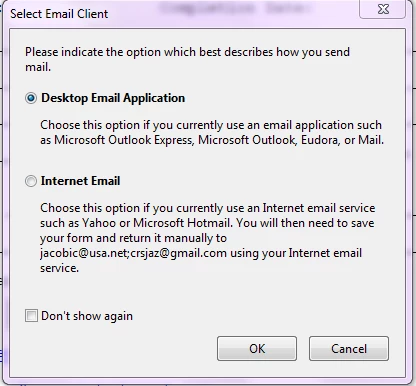
I cannot get the Submit a Form button to work using emails - I get a dialog box - I have other email addresses. HELP
  • May 1, 2017
  • 3 replies
  • 560 views

This topic has been closed for replies.

3 replies

Legend
May 1, 2017

The right choice is based on how YOU send YOUR emails. Acrobat Reader can't make this decision for you. You need to know, and everyone is different. It is not related to the emails you send TO at all.

If you don't know, just save the file and email it as an attachment in the normal way.

Bernd Alheit
Community Expert
Community Expert
May 1, 2017

The displayed email addresses are only samples.

carrieazAuthor
Participant
May 1, 2017

What is the right choice? The e-mails I need to send the form to are gmail and a company email

I am posting this on a web site and everyone in the community will use it.. so not sure what to do next

The first screen I get after the one I posted is:

The second one I see when I click the New button:

I followed the above screen steps and got to this

So not sure what to do next - if I set up the e-mails required on my system what happens to all the others who need to send this form to the 3 different e-mails on the form?

Thank you for your help

Legend
May 1, 2017

That's the normal dialog box, not an error. What happens when you make the right choice?

carrieazAuthor
Participant
May 1, 2017

What is the right choice? The e-mails I need to send the form to are gmail and a company email

I am posting this on a web site and everyone in the community will use it.. so not sure what to do next

The first screen I get after the one I posted is:

The second on I see is:

I followed the above screen steps and got to this

So not sure what to do next - if I set up the e-mails required on my system what happens to all the others who need to send this form to the 3 different people on the form?

Thank you for your help

Bernd Alheit
Community Expert
Community Expert
May 1, 2017

The forum doesn't accept attachments.