

Participant
March 28, 2025
Question

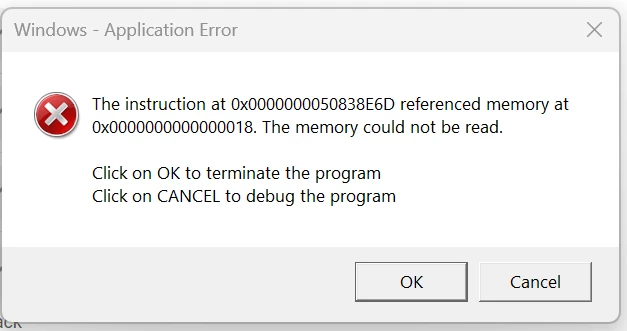
I get this application error every time I open up a PDF

  • March 28, 2025
  • 1 reply
  • 982 views

I do not know what to do with this.  I uninstalled and then installed again and I am still having an issue.  Doesn't matter which PDF I open.
 

1 reply

AnandSri
Legend
April 1, 2025

Hello!


I hope you are doing well.


Please restart the machine once and check for any pending updates of Acrobat from the Menu > help > check for updates, install the updates, restart the app and the machine, and check. For more information, see this: https://adobe.ly/3FPVaTG


Is it happening with all the PDFs, or is it specific to one PDF? What's the current version of the OS installed? 

  1. Open Acrobat, go to Menu > Preferences > Security (Enhanced), and uncheck "Run in AppContainer". Restart Acrobat.

  2. If the issue persists, try running Acrobat in Compatibility Mode:

    • Right-click the Acrobat icon and select Properties.

    • Go to the Compatibility tab.

    • Check the box "Run this program in compatibility mode for" and select Windows 8 from the dropdown.

    • Click Apply, then OK.

If you still get the error message, please use the Acrobat Cleaner tool to remove the installed app, restart the machine and install Acrobat.


Let us know how it goes.

Thanks,

Anand Sri.

Luke Jennings3
Community Expert
Community Expert
April 1, 2025

It wouldn't hurt to ask your IT person to check the RAM on your computer:

https://www.microsoft.com/en-us/surface/do-more-with-surface/how-to-use-windows-memory-diagnostic
