
Angell EYE
Inspiring
April 7, 2020
Question

I'm confused about using Acrobat for digital signatures.

  • April 7, 2020
  • 1 reply
  • 1020 views

I have a document I'd like to sign and have someone else sign as well.  I have signature lines on the document.


Side Note:  I am personally lending some cash to a business that I am 50/50 owner of.  As such, I am signing as the lender and as one of the borrowers.


I used the Sign tool to place my signature in my spots, and then I selected to ahve somebody else sign.  It asks where I want them to sign, and I draw the box in his spot above his signature line.


When I get it back, though, it has this extra "Signature" at the bottom, tagged with his email address, and also has general text at his signature line.  Here's what I got on the document:
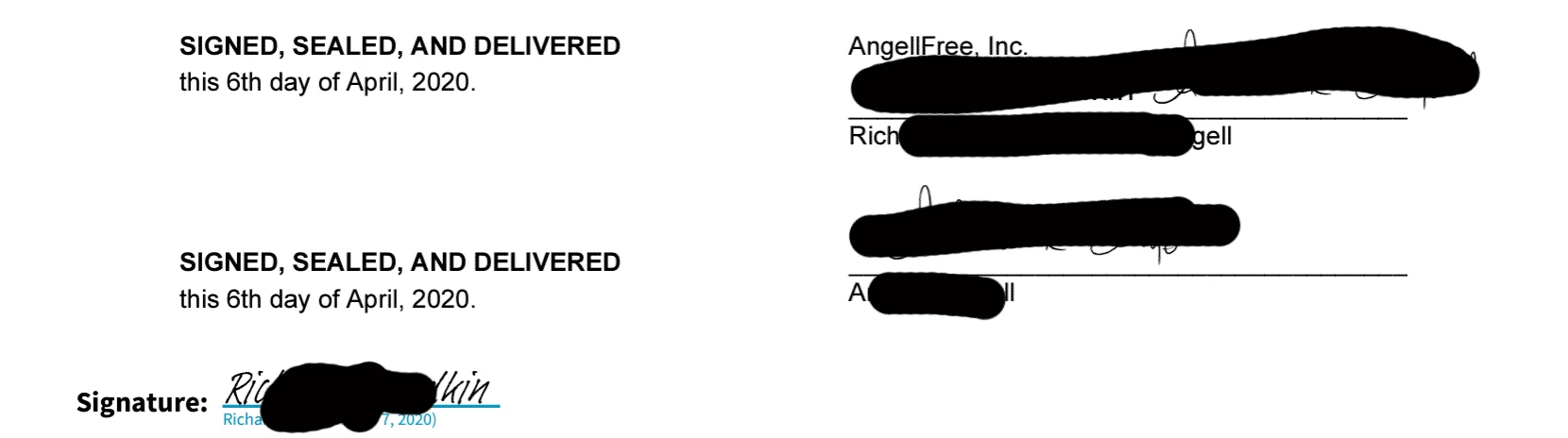


Why does it put this extra thing in there?  Why doesn't it have one of those for me? 


Also, will this type of signature really hold up in court?  It seems like I could just setup a bogus email account, write a document and send it to this account, act like the second party and sign the document digitally, and then I'd have essentially the same thing I have now even though the actual person signed in.  


Or on the flip side of that, even if the actual person did sign it, they could just claim that's not their email address..??


Any information on this would be greatly appreciated.  Thanks!


This topic has been closed for replies.

1 reply

Amal.
Legend
April 7, 2020

Hi there 


We are sorry for the trouble and the experience you had. As described, you are getting extra "Signature" at the bottom, tagged with the email address.


Would you mind sharing the workflow/steps you are doing to send the document for signatures?


Please try to send the document for signature as described below and see if that helps:


  • open the document in Adobe Acrobat DC > Go to Tool > Fill and Sign > Request for signature
  • Add the recipient's email (including your email) in the order you want to get the document signed.
  • Click on 'More Option' at the bottom of the page
  • Select 'Preview & Add Signature Fields' at the bottom and click Next
  • Drag the Digital Signature Field and Signature Info fields on to the document as required and send the document for signature.

For more information please refer to the help article (https://helpx.adobe.com/in/acrobat/using/send-for-signature.html)


A certificate-based signature, like a conventional handwritten signature, identifies the person signing a document. Unlike a handwritten signature, a certificate-based signature is difficult to forge because it contains encrypted information that is unique to the signer. It can be easily verified and informs recipients whether the document was modified after the signer initially signed the document.

To sign a document with a certificate-based signature, you must obtain a digital ID or create a self-signed digital ID in Acrobat or Adobe Reader. The digital ID contains a private key and a certificate with a public key and more. The private key is used to create a certificate-based signature. The certificate is a credential that is automatically applied to the signed document. The signature is verified when recipients open the document.


For more information please refer to the help articles listed below:

  1.  (https://helpx.adobe.com/in/acrobat/using/certificate-based-signatures.html)
  2.  (https://helpx.adobe.com/in/acrobat/using/digital-ids.html)


I hope this will help.


Regards

Amal


Angell EYE
Inspiring
April 15, 2020

Thanks for the quick reply.  Sorry, I didn't see the notification about it so I didn't get back here until now to check.


The workflow that you outlined here is exactly what I did.  I drew the boxes where the signature line actually is, and my signature stays there nicely.  But when others sign these and return them, I always end up with that extra signature at the bottom of the doc no where near a signature line.  This example has the signature where I drew the box, but also the extra one at the bottom.


Can you think of anything that would be causing that?  I could do a video for you if it helps, but I am literally do the exact steps you mentioned here.

Amal.
Legend
April 20, 2020

Hi there 


we are sorry to hear that.


Would you mind sharing how the document is getting signed by the other users?  


What is the application and the workflow or steps they are doing to sign the document? Make sure they are using the Adobe Acrobat / Reader DC application to sign the document.


Regards

Amal