Michelle38051592s1e9
Participating Frequently
July 8, 2024
Answered

I need a custom script that would input information in a cell if input were entered in the row.

  • July 8, 2024
  • 2 replies
  • 1203 views

Is there a way to put a custom script in when there is input in the row and in the operator cell would input their name on it? Any help would be appreciated.

This topic has been closed for replies.
Correct answer PDF Automation Station

New Question Same Form:

Ok, one last thing and then I think I will have all the issues worked out thanks to you. I am needing my EndingOdometer to equal the last EndOdomReadingRow# once their input is finished. Which everyone's is different.
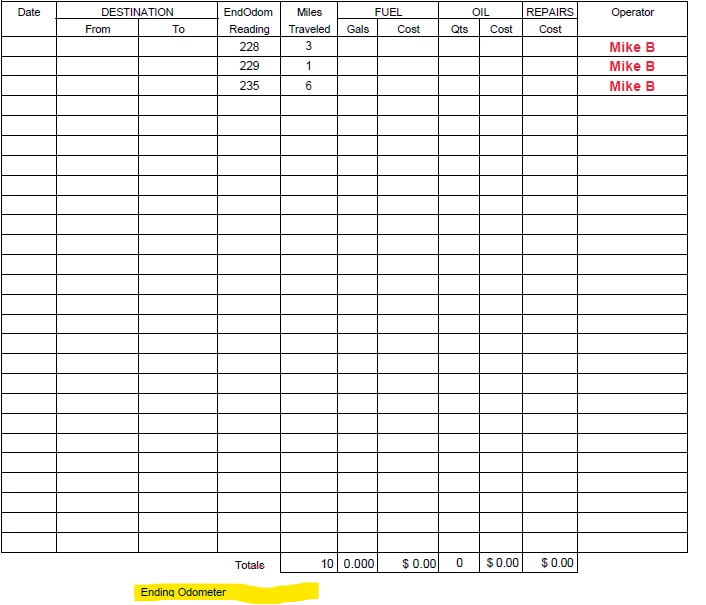
I really am so appreciative because I am not able to find the information online and I have done the research. This community and you are very helpful resources.


var odm="";
for(var i=26;i>0;i--)
{
if(this.getField("EndOdomReadingRow"+i).value)
{odm=this.getField("EndOdomReadingRow"+i).value;break;}
}

event.value=odm;

2 replies

Thom Parker
Community Expert
Community Expert
July 8, 2024

Yes, Use a custom calculation script in the "OperatorRow#" field. 

There are various ways to do this, but the general idea is something like this.


var oFldDate = this.getField("DateRow1"); 

var oFldFrom = this.getField("FromRow1"); 

var oFldTo = this.getField("ToRow1"); 

if((oFldDate.valueAsString != "") && (oFldFromvalueAsString != "") && (oFldTo.valueAsString != "") && ... etc ...)

    event.value = this.getField("User Name Field").value;


This will be a fairly long script because of the number of fields, and it will need to be on every "Operator" field. 

Two things you can do to simplify the script are

1) Create a more generalized document level function

2) Use a naming convention that will allow the script to acquire all fields in the row in a single go.  For example: Row1.Date, Row1.From, etc.


Thom Parker - Software Developer at PDFScriptingUse the Acrobat JavaScript Reference early and often
Michelle38051592s1e9
Participating Frequently
July 8, 2024

Okay, I do get that  but how about if we only use if they enter the EndOdomReading then the Operator Field would populate with their name.

PDF Automation Station
Community Expert
Community Expert
July 8, 2024

Where is the name coming from?  The Adobe identity under Edit>Preferences>Indentity>Name?  A form field value?  Somewhere else?  If it's from the Adobe identity, see my answer above and enter the script in all of the EndOdomReading fields and change the row number in the script to the corresponding row for each.  If it's from a field you wouldn't need a trust function and the script would be:

if(event.value)

{this.getField("OperatorRow1").value=this.getField("Operator").value;}

Make the operator field readonly so it can't be changed manually.

PDF Automation Station
Community Expert
Community Expert
July 8, 2024

You would need a trusted function in a folder level script to access the Name parameter of the identity object (Edit>Preferences>Identity>Name) on the Acrobat menu.  You would then enter a custom validation script into every field in the row that sets the corresponding Operator field to the name of the user, conditional on whether the field has a value.  Example of trusted function:


fill_Operator = app.trustedFunction( function (oDoc,oFld)
{
app.beginPriv();
oDoc.getField(oFld).value=identity.name;
app.endPriv();
})


Example of the validation script:


if(event.value)
{
fill_Operator(this,"OperatorRow1");
}


If you use Right-click>Create Multiple Copies to create your fields you can end up with one validation script to copy to all fields with this tip.