Snowdog63
Inspiring
April 14, 2026
Answered

I need to save a PDF at a larger size

  • April 14, 2026
  • 3 replies
  • 49 views

I have designed a 20 page A5 brochure. I would like to save out an A3 version & thought this would be a simple matter, but it seems it is not.

I followed some instructions on the Adobe site which essentially sent me to the print dialog box, wherein I can type the desired percentage. Unfortunately, that only gives me the option to print at the larger size & not to save the file. (I am familiar with the dropdown menu where you choose a printer containing the option to “print” a postscript file but it’s not there in this instance.)

Should that work? Am I missing something obvious or is there another way?

    Correct answer radzmar

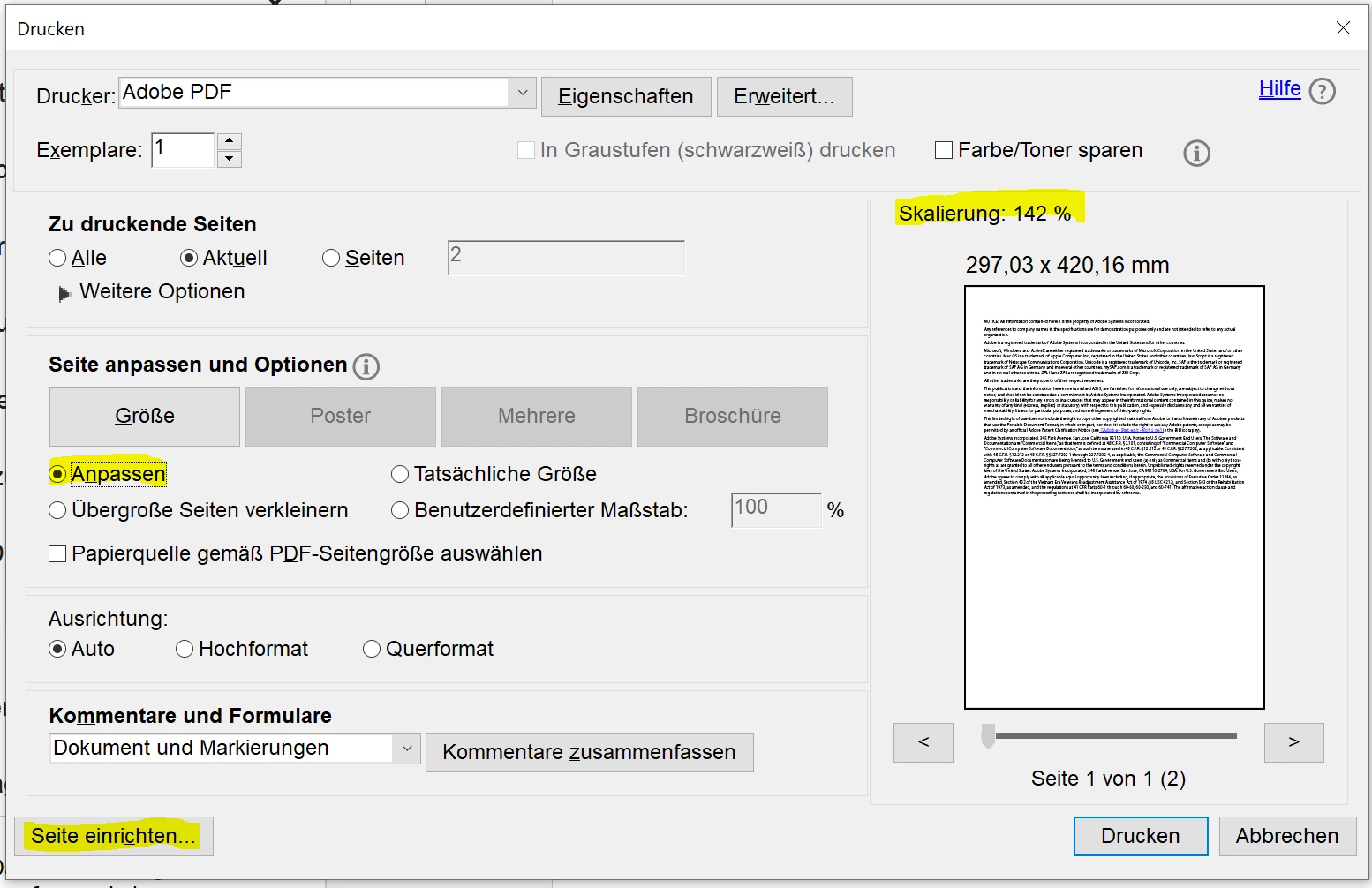
    With a the Adobe PDF printer this should be possible. Open the print dialog and there set the page size to the desired format with the “Page setup” button in the bottom left corner. Then set sizing to “Fit”. The document automatically scaled up or down to fit the page size. Then print to create the rezised version of the document.


    3 replies

    radzmar
    Community Expert
    radzmarCommunity ExpertCorrect answer
    Community Expert
    April 15, 2026

    With a the Adobe PDF printer this should be possible. Open the print dialog and there set the page size to the desired format with the “Page setup” button in the bottom left corner. Then set sizing to “Fit”. The document automatically scaled up or down to fit the page size. Then print to create the rezised version of the document.


    Snowdog63
    Snowdog63Author
    Inspiring
    April 15, 2026

    Thanks. I didn’t want to print it, though, I wanted to save a new PDF.

    radzmar
    Community Expert
    Community Expert
    April 16, 2026

    By printing it over a PDF printer you're creating a new PDF file. 

    gary_sc
    Community Expert
    Community Expert
    April 14, 2026

    Hi, ​@Snowdog63, just to confirm, do you want the text to reflow with the the A3 conversion, or just be a change in font size.

    The EASIEST way to do this is to go back to the original software that you created the document.

    The 2nd easiest way to do this is to export the document to Word, redo the page size and import back to PDF. 

    Snowdog63
    Snowdog63Author
    Inspiring
    April 15, 2026

    Thanks.

    In the end, I scaled the document in InDesign & then made a new PDF from there.

    I had to do it manually because, as is so often the case, Adobe’s automated processes weren’t fit for purpose. (In this instance, using the “adjust layout” feature, the paragraph styles were not scaled so all of my paragraph spacings ended up wrong. Neither were the keylines around my images & the stroke around some of the type.)

    Scaling each spread manually (fortunately there were only 10) did the trick. Stylesheets remained unaffected, so I had to be careful not to click on any of them, but everything else scaled okay.

    Karl Heinz  Kremer
    Community Expert
    Community Expert
    April 14, 2026

    You need to use the preflight tools in Adobe Acrobat Pro do to that. See here for (old) instructions:

    https://khkonsulting.com/2017/03/scaling-page-content-in-adobe-acrobat-pro-dc/