


Inspiring
October 21, 2025
Answered

If textbox contains text, checkbox is marked

  • October 21, 2025
  • 2 replies
  • 155 views

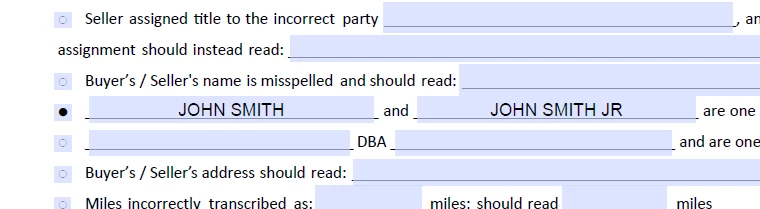
I would like to make sure that whenever I type anything into that first box (John Smith) that the corresponding checkbox (black circle) automatically marks itself, and when the John Smith box is empty, the checkbox returns to its normal state.


Thanks!

Correct answer Thom Parker

This type of feature requires a script, which requires knowing the name of the checkbox field.  

I'll assume the name of the checkbox field is "NameCheck". 

Add this script to the Custom Validation script on the "John Smith" field.

this.getField("NameCheck").checkThisBox(!/^\s*$/.test(event.value),0);

2 replies

Thom Parker
Community Expert
Thom ParkerCommunity ExpertCorrect answer
Community Expert
October 21, 2025

This type of feature requires a script, which requires knowing the name of the checkbox field.  

I'll assume the name of the checkbox field is "NameCheck". 

Add this script to the Custom Validation script on the "John Smith" field.

this.getField("NameCheck").checkThisBox(!/^\s*$/.test(event.value),0);
Thom Parker - Software Developer at PDFScriptingUse the Acrobat JavaScript Reference early and often
PDF Automation Station
Community Expert
Community Expert
October 21, 2025

Enter the following custom calculation script in the text field:

if(event.value){this.getField("Check Box1").checkThisBox(0,true)}
else
{this.getField("Check Box1").checkThisBox(0,false)}

Change the name of the check box in the script to the actual name.  You should also make the check box field read only so the user can't manually change it.