
Participant
January 8, 2025
Answered

If/then/add statement; Multiple if's, then get fields, and total in that field

  • January 8, 2025
  • 1 reply
  • 413 views

I've tried so many differe scripts and none are working.

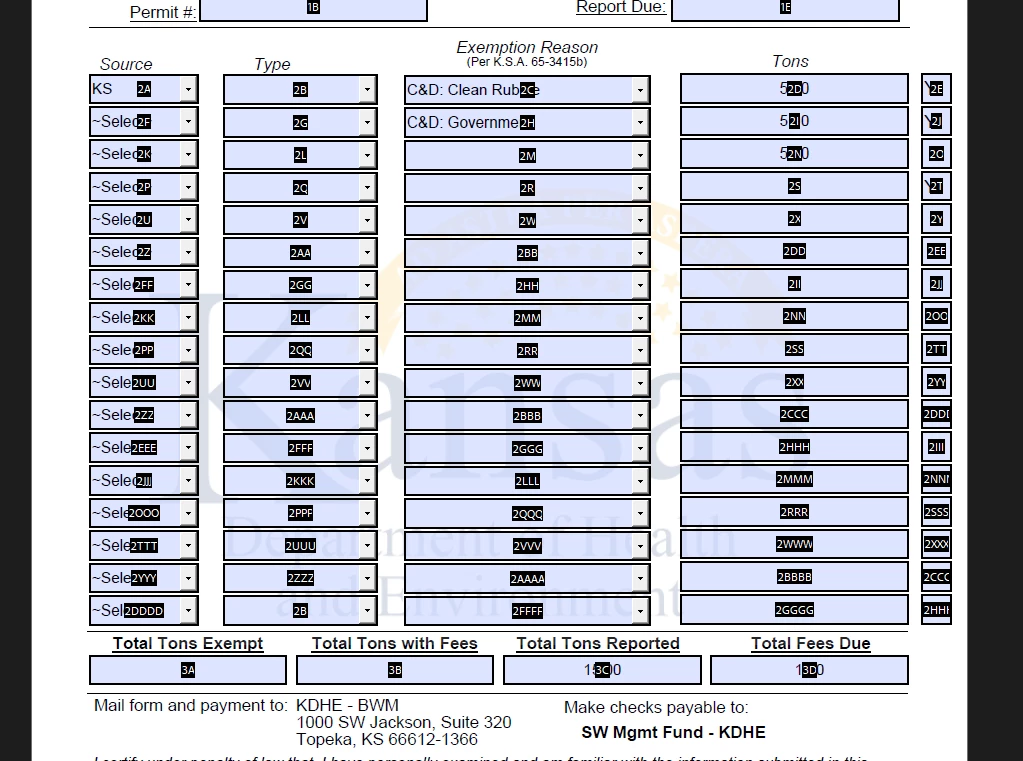
Per the picture, I need the following:

if 2E (which will be hidden) = "Y", then get the value of 2D, etc.

Then total all values that have a "Y" in 3A.
Correct answer PDF Automation Station

If you have a numbering system for naming your fields it would make things a lot easier for you.  Without consistency in field naming you're going to end up with monster script subject to errors for a simple calculation.  You had a lot of errors in your scripts, mostly lower case f's in this.getField, which you can find by checking the console for errors.  I renamed the first row of your fields, deleted the rest, only entered one script into the first TonsYes field, then used the technique in the article linked above (Right-click > create multiple copies).  Then I wrote the script in the 3D field.  I also used "Sum of" in field 3C.  You only have to select one field (Tons in this example) when you name the fields properly.  See attachment.


1 reply

PDF Automation Station
Community Expert
Community Expert
January 9, 2025

If you have a numbering system for naming your fields it would make things a lot easier for you.  Without consistency in field naming you're going to end up with monster script subject to errors for a simple calculation.  You had a lot of errors in your scripts, mostly lower case f's in this.getField, which you can find by checking the console for errors.  I renamed the first row of your fields, deleted the rest, only entered one script into the first TonsYes field, then used the technique in the article linked above (Right-click > create multiple copies).  Then I wrote the script in the 3D field.  I also used "Sum of" in field 3C.  You only have to select one field (Tons in this example) when you name the fields properly.  See attachment.


Participant
January 10, 2025

Thank you! That is what I needed. And I see your point on the naming conventions. That is a lot easier. The only change I had to make was you have it pulling from the "source" column and I need it to pull from the "reason" column, but that was easily doable. Thank you again!