
Known Participant
January 20, 2024
Answered

If Then and Average Formula in PDF using Checkboxes

  • January 20, 2024
  • 3 replies
  • 1465 views

Hi Everyone,


I am trying to a formula which I believe would be an "IF, THEN" formula for my performance evaluation form. Basically what I need to happen is that if a checkbox is selected in a row in any of the 5 columns (i.e., unacceptable, Needs, Meets, Exceeds, Outstanding) with each worth a score between 1-5 respectively, then in the total column it will reflect a number between 1-5 according to the rating scale (see screen shot below). So if the Unacceptable box is checked in the first row, the Score should equal 1; 
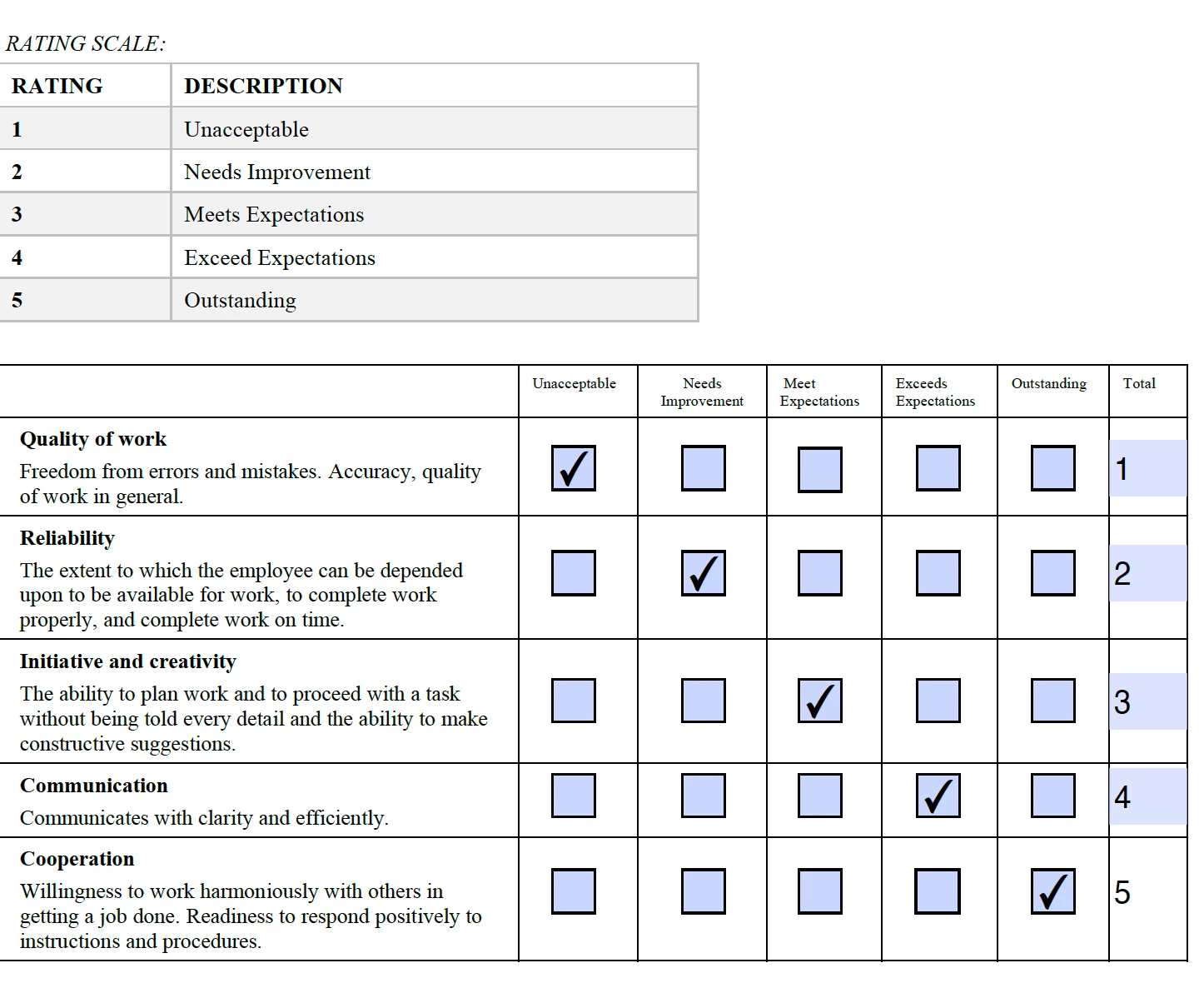
I am also looking for an average formula to average all the numbers out to 1 whole number

 

Can you please help me? 


Thank you so much!

This topic has been closed for replies.
Correct answer Nesa Nurani

You don't need script for this, give each checkbox export value to be the score for that checkbox, for example give 'Unacceptable' checkboxes export value 1, 'Needs' export value 2...etc (you can set export value in checkbox field properties, under 'Options' tab)

Now just go to text field properties and under 'Calculate' tab select 'Value is the' (Sum+) and pick checkboxes.

Do the same for average, just instead of Sum+ select (average) and pick fields you wish to get average score.

3 replies

Nesa Nurani
Community Expert
Nesa NuraniCommunity ExpertCorrect answer
Community Expert
January 20, 2024

You don't need script for this, give each checkbox export value to be the score for that checkbox, for example give 'Unacceptable' checkboxes export value 1, 'Needs' export value 2...etc (you can set export value in checkbox field properties, under 'Options' tab)

Now just go to text field properties and under 'Calculate' tab select 'Value is the' (Sum+) and pick checkboxes.

Do the same for average, just instead of Sum+ select (average) and pick fields you wish to get average score.

Known Participant
January 22, 2024

Thank you so much for your help! I was given a formula before for this type of form but for some reason it was no longer working. This method is much simpler. Thanks a million!

Known Participant
February 27, 2024

Hi Nesa,


I have a followup question to this. On this same form, there is a question for just managers (see screen shot). Currently, the average formula is calculated all scores from each section. Is there a way to have the average only calculate scores that have a score between 1-5 in each section rather than including all sections even if they don't apply? Does that make sense? 


So for this scenario, only the above section applies and I'd like the average to only average the scores from the 7 questions above. But if there is a score in the next section, then include that in the average too.


Known Participant
January 20, 2024

@Thom Parker Can you help me with this?

Known Participant
January 20, 2024

The screenshot shows essentially what I want to happen as the end result