


Participant
February 10, 2022
Answered

Image quality kind of decreases when adding to PDF

  • February 10, 2022
  • 2 replies
  • 11542 views

I'm using Adobe acrobat Pro DC and when I try to make png file in to pdf, the problem occurs.
Here's what I do
1) I have a png file of 1920x1080 resolution (it's a screenshot)
2) I open Adobe acrobat and use the "Organize Pages" function, select a file(png) and open it up

3) Save the PDF file created.

Now, the overall image quality, especially the text seem very unclear and dirty although the resolution remains the same.
Below is a comparison(upper one is the original)


 

Does anyone have similar issues? I didn't change anything in the settings, they're pretty much default. Thanks

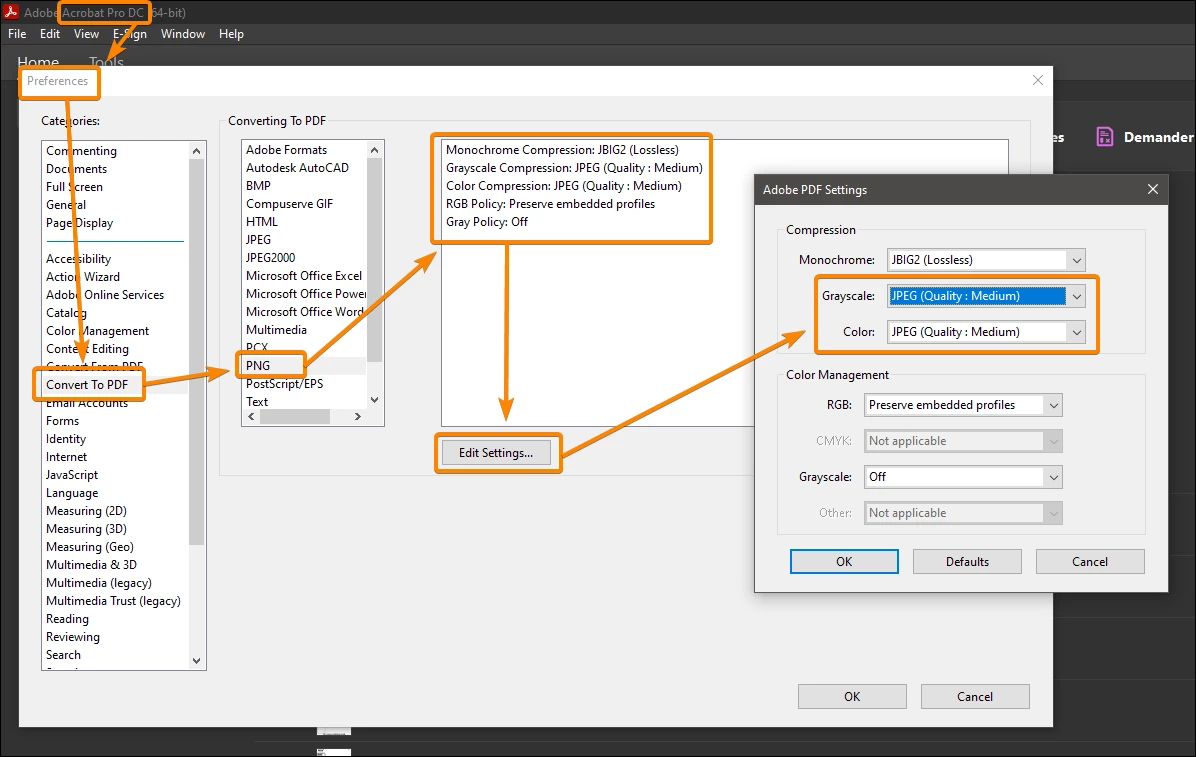
Correct answer JR Boulay

You must change the default settings since they are "JPEG, quality:medium".

You should use "JPEG, quality maximum" or "JPEG2000, Lossless".


2 replies

JR Boulay
Community Expert
Community Expert
February 19, 2025

Opening or importing a PDF into another PDF does not change the compression or resolution of the images.
Unless you use PDF Optimizer, or Distiller to refry it.

Acrobate du PDF, InDesigner et Photoshopographe
JR Boulay
Community Expert
JR BoulayCommunity ExpertCorrect answer
Community Expert
February 10, 2022

You must change the default settings since they are "JPEG, quality:medium".

You should use "JPEG, quality maximum" or "JPEG2000, Lossless".


Acrobate du PDF, InDesigner et Photoshopographe
Participant
February 10, 2022

Holy damn it works great!! Thanks for your help. Have a great day