
Participant
November 22, 2019
Answered

Images have self-generated pop-ups when converted to PDF

  • November 22, 2019
  • 4 replies
  • 46516 views

I have created a PDF (from MS Word) which contains text and images. The images were taken on my smartphone and inserted into Word. There are no tags or properties that have any 'layman's' description of the content of the images (either when standalone images or after insertion into Word), but once I have saved the Word document as a PDF and open it in Acrobat, if I hover over the images a pop-up shows with a brief generic description (it has detected some trees, so has added "A close-up of a tree - Description automatically generated") - I can't see where this is happening or how to stop it. Any help appreciated.
Correct answer maxwithdax

None of these answers are actually addressing the Post's original question:

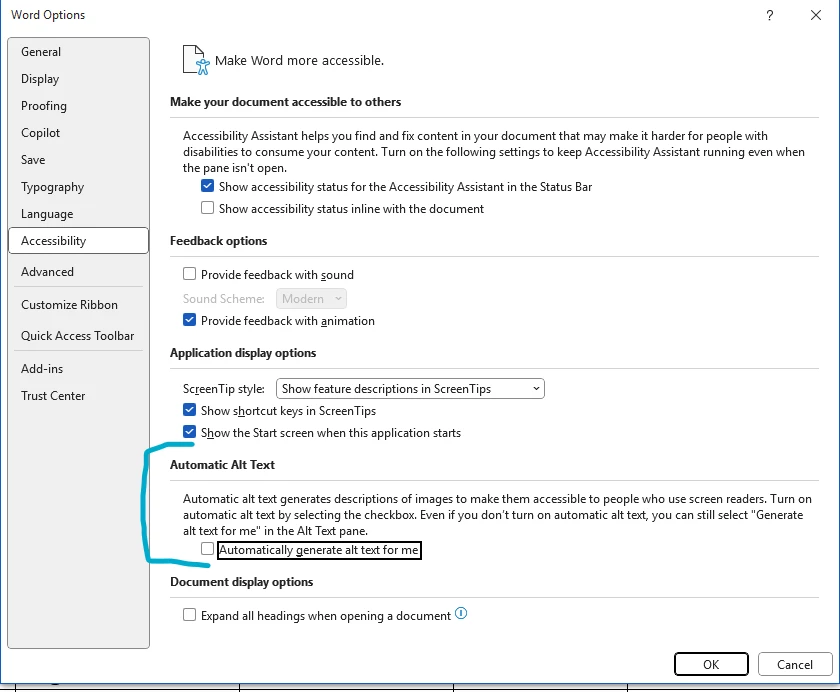
How can I turn off these automatic suggested alt text.

In Word or PowerPoint go to:

  1. Click Review
  2. Click the dropdown for Check Accessibility
  3. Select Options: Accessibility
  4. Uncheck Automatic Alt Text


4 replies

maxwithdax
Community Expert
maxwithdaxCommunity ExpertCorrect answer
Community Expert
September 22, 2025

None of these answers are actually addressing the Post's original question:

How can I turn off these automatic suggested alt text.

In Word or PowerPoint go to:

  1. Click Review
  2. Click the dropdown for Check Accessibility
  3. Select Options: Accessibility
  4. Uncheck Automatic Alt Text


Participant
March 23, 2022

When saving as a PDF, instead of using the "Export" option to create a PDF, select "Save As> Browse>" then select PDF. Before saving, click the "Options" button, go to "Include non-printing information" and deselect "document structures tags for accessibility". This should do the trick! 


Santiago Roberto Cortés
Participant
March 23, 2022
No me envíen más correos electrónicos
Joel Geraci
Community Expert
Community Expert
November 22, 2019

Word is automatically adding "Alt text" to the image for accessibility purposes. When you convert to PDF through Acrobat, the Alt Text gets added to the image and produces the rollover you are seeing. You can either delete the Alt Text from the image in Word, or you can deselect the option in the Create PDF preference to add accessibility tags.


Participant
February 18, 2020

I'm having the same issue. I created a document in MS Word -- with text only. No images. Once completed, I copied all of the text and pasted it into my PDF. Now, when I scroll across the words it says


"A screenshot of a cellphone. 


Description automatically generated." 


Can anyone tell me how to remove this? 

Participant
April 2, 2020

I am having the same issue...is there a setting I need to go to to remove? 

try67
Community Expert
Community Expert
November 22, 2019

How exactly are you converting the files from Word to PDF? Do you have Adobe Acrobat? If so, which version?