
Known Participant
July 4, 2022
Answered

Import data from xfdf file

  • July 4, 2022
  • 2 replies
  • 1372 views

I am testing out both FoxIt and Acrobat for a solution that populates a pdf file from MS Acess.  FoxIt has a nice Import and Export under the Forms tab, but I don't see any similar easy way in Acrobat DC to populate a form from an xfdf file.  Am I missing something?
 

This topic has been closed for replies.
Correct answer JR Boulay

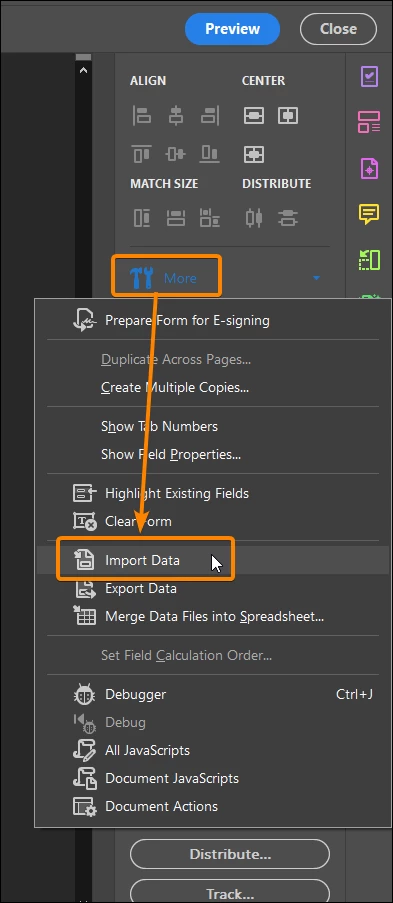
Open the "Prepare Form" tools and click the "More" menu:


2 replies

JR Boulay
Community Expert
JR BoulayCommunity ExpertCorrect answer
Community Expert
July 5, 2022

Open the "Prepare Form" tools and click the "More" menu:


Acrobate du PDF, InDesigner et Photoshopographe
Souvik Sadhu
Community Manager
Community Manager
July 4, 2022

Hello Stanley,


I hope you are doing well. As per the above description, I understand that you want to import data from XFDF files to PDF.


You may try the below steps once:

1. Open the PDF;

2. Click on the comments tab on the right tool panel;

3. Click on the three dots on the top right;

4. Locate the XFDF file;

5. Once imported, it should auto-populate the file;


Let me know if it works.


Thanks,

Souvik.