
Inability to Align Table Grid
Hello,
I've created this table in Word 365, saved as a PDF, and opened it in DC (2017.009.20044).
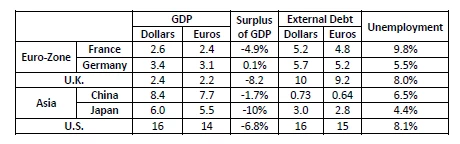
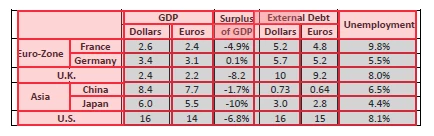
Below is what an autotag looks like in the Table Editor. Although all RowSpans and ColSpans
are set correctly, the grid shows a split across the "Surplus" RowSpan=2 that shouldn't be there,
and in fact isn't when I check the attribute settings.
For a closer look at the Surplus cell,
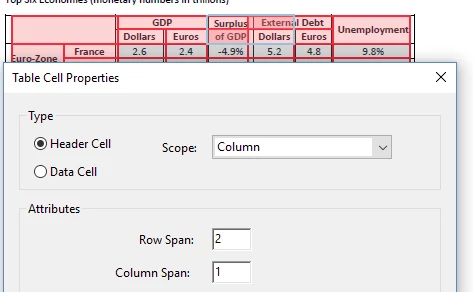
so again, the spanning is correct in this and the other header cells.
I've seen that the physical layout, including text being way too small or large, or being well off-center
in its header cell, can throw the grid, even though the span settings are correct and regularity passes.
This limits the effectiveness of the grid as a guide.
The table has 1-1/2 point borders, cell padding set to zero. I've tried using cell padding, and
increasing the width of the columns, and decreasing font size to provide more space around the text.
None of that, nor toggling word wrap in the cells, makes a difference in the autotagging of the converted PDF.
What might be going on here?
I am wondering if it relates to a broader issue with RowSpans.
Something I'm finding is that, going left to right, if you have a RowSpanned column header following
a ColSpanned column header, JAWS and NVDA may not like it, particularly if it's at the right edge of the table.
Above, instance, in you are down-arrowing and get to the the first data cell beneath Unemployment,
it reads as Column 9 (in an 8 column table). If you're in table navigation mode holding down CTRL+ALT,
you can't enter the 9.8% cell because NVDA keeps finding "edge of table," but you can go around and enter
the cell beneath it (5.5%). JAWS has it's own error that indicates it is not interpreting the boundaries of the RowSpan=2 for Unemployment correctly.
Does any of this sound familiar?
P.S. It doesn't matter whether one uses Scope or Headers and ID. It doesn't seem to be an association issue
but one with how the table grid is "seen."
Thanks much,
Chris Niestepski
 AdChoices