
Participant
August 5, 2024
Question

Incorrect highlighting in "font is italic" preflight report in searchable pdf

  • August 5, 2024
  • 1 reply
  • 445 views

Dear Colleagues, 


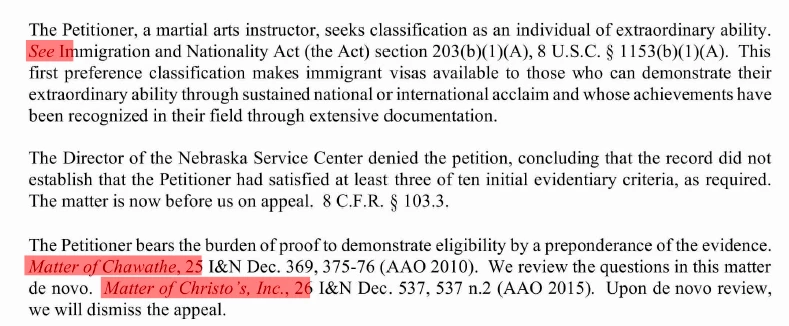
I have a problem. There is annoying extra space highlighted after each instance of italic text in preflight reports, which includes 1-2 symbols that are not in italic in the original document. This makes the process of comparing with a source document during its manual conversion to markdown-formatted plaing text less convenient. Attached is an example. 


I understand that the root of the problem that it is a searchable pdf.  But is there any possibility on how to make reports more accurate? 


Link to a file: https://sport-science.pro/pdf/DEC212023_01B2203.pdf 


This topic has been closed for replies.

1 reply

try67
Community Expert
Community Expert
August 5, 2024

I don't have this issue:


What version of Acrobat are you using, exactly?

Participant
August 6, 2024

The latest release, Adobe Acrobat Pro 24.002.20933. I have also checked at other workplace with older version of Adobe Acrobat, result was the same.


Is your screenshot also a result of preflight report? You have changed the default color of errors marking, right?


Your report doesn't highlight Matter of Chawathe and wrongly highlights "26" which is not written in italic. Well, it does good with highlighting See, so I an interested in finding the reason of the difference between our reports.

try67
Community Expert
Community Expert
August 6, 2024

I didn't notice this was the result of a Preflight report... I just used the Highlighting commenting tool manually.

Does that work correctly for you?