dariof13672426
Participant
March 22, 2019
Answered

InDesign Interactive Form and Adobe Sign

  • March 22, 2019
  • 1 reply
  • 824 views

I have an interactive form created in InDesign, where 2-4 people have to sign it to pass it from one dept to another one. when I try adobe sign, it gives me problem with the data fields. So i tried to remove them but i try to sign the document it wont let me click on next unless i sign every single fields...  what do i do?

Adobe Document Cloud Tradeshow Form

This topic has been closed for replies.
Correct answer Meenakshi_Negi

Hi Dariof,

Indesign interactive form fields do not work in Adobe Sign. It will automatically detect the form fields which will work when you upload the document to Adobe Sign.

If you need those data fields, you can create the form fields in the Adobe Sign.

I have checked the form that you have shared in the link above.

I see that you have assigned all the signature fields to the single signer. You need to assign each signature field to the individual signer.

Take help of the steps provided in this help document Send agreements and collect signatures

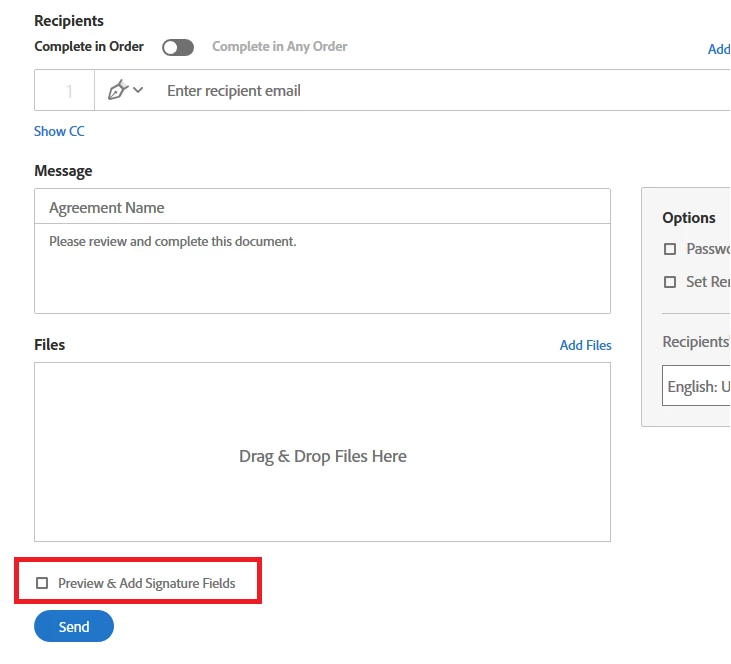
When you send the document for signature, please make sure that you check the box for "Preview & Add Signature Fields". Check the screenshot below:
To add and assign the form fields, please refer to the steps mentioned in the following help documents

- Field types

- Assign form fields to recipients

Hope that will help.

Let us know if you have any questions.

Regards,

Meenakshi

1 reply

Meenakshi_Negi
Meenakshi_NegiCorrect answer
Legend
March 23, 2019

Hi Dariof,

Indesign interactive form fields do not work in Adobe Sign. It will automatically detect the form fields which will work when you upload the document to Adobe Sign.

If you need those data fields, you can create the form fields in the Adobe Sign.

I have checked the form that you have shared in the link above.

I see that you have assigned all the signature fields to the single signer. You need to assign each signature field to the individual signer.

Take help of the steps provided in this help document Send agreements and collect signatures

When you send the document for signature, please make sure that you check the box for "Preview & Add Signature Fields". Check the screenshot below:

To add and assign the form fields, please refer to the steps mentioned in the following help documents

- Field types

- Assign form fields to recipients

Hope that will help.

Let us know if you have any questions.

Regards,

Meenakshi