


Known Participant
April 9, 2025
Answered

Information is removed when I combine two of the same document

  • April 9, 2025
  • 3 replies
  • 978 views

I work in design sales. I have created digital PDFs to support my work and when I have multiple spaces I am designing, I have to fill out multiple Job Specification sheets. However, when I combine multiples of the same editable PDF, it deletes all of the information off of one of the Job Specifications sheets and I don't understand why this is happening. Do we know why it is getting deleted? And how do I combine files into a Binder with all of the information in tact?

Correct answer Thom Parker

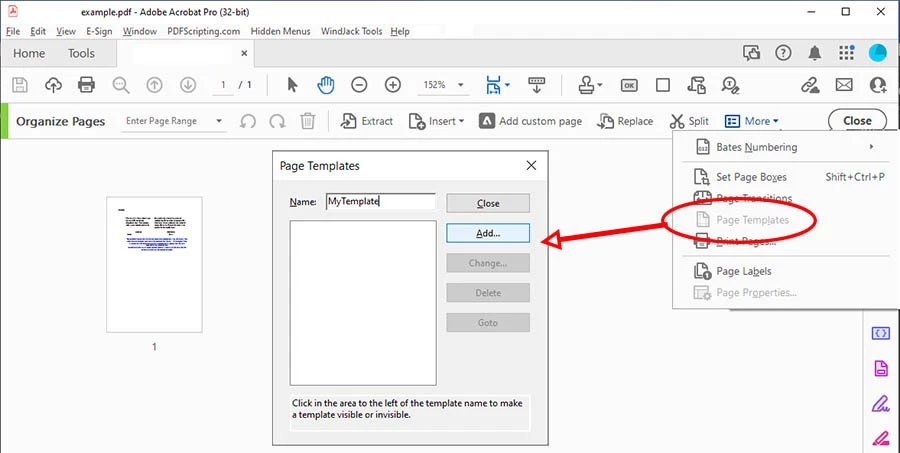
A page template is just what it sounds like. It is a regular PDF page that is used as a template for creating new pages. 

Here are the steps.

1. Create a new page, or a copy of a page, in your PDF with all the text and fields needed for a new page. 

2. Turn it into a template.

      -- Go to the "Organize Pages" toolset

      -- Make sure the page to be used as the template is selected.

      -- Select "Page Templates" from the "More..." menu

       -- Enter a name for the template and push the Add template button

      -- Hide the new page template. 

3.   Add a button somewhere on the PDF to  add a page. 

      Put a script on the button so spawn a new page template. 

      this.getTemplate("MyTemplate").spawn(nPg,true,false);

Here's the reference entry for the template object:

https://opensource.adobe.com/dc-acrobat-sdk-docs/library/jsapiref/JS_API_AcroJS.html#template


4. If there are fields with scripts on the page, then they will need to be rewritten to use the proper page template field name prefixes. 


3 replies

Thom Parker
Community Expert
Community Expert
April 9, 2025

Your Job Specification sheet needs to be upgraded to use Page Templates to add new spec pages. This will solve your issue. 


Thom Parker - Software Developer at PDFScriptingUse the Acrobat JavaScript Reference early and often
Known Participant
April 10, 2025

How does one upgrade to use Page Templates?

Known Participant
April 10, 2025

And what are the page templates/why will they solve the issue?

try67
Community Expert
Community Expert
April 9, 2025

This is normal behavior. Multiple fields that have the same name in a single PDF file will become duplicates of one another and have the same value automatically. This can't be avoided.

To get around that your options are:

- Combine the files as a Portfolio, which is an "envelope" PDF that has other files attached to it, or

- Flatten the form fields in the original files before merging them, or

- Rename the fields in the files so that they are unique and won't overwrite one another when merged.

Amal.
Legend
April 9, 2025

Hi there


Hope you are doing well and thanks for reaching out.


Is this an issue with a particular set of PDF files or with other PDFs as well? Please try with a different set of PDFs and check.


What is the version of the Acrobat Pro and the OS you are using? Go to Help > About Acrobat and make sure its updated to the latest version 25.01.2043X go to Help > Check for updates and reboot the computer once.


Also, share a small video recording of the steps you are taking to combine the PDF files and the issue as it occurs.


To know more about combining the PDFs please check the help page https://adobe.ly/42BrnXE